Developing in Agentic AI Systems — Learning Content
Combined instructional content from both Microsoft Learn paths. Microsoft Learn navigation, badges, metadata, prerequisites, assessments, and other page chrome are omitted.
Source learning paths
Section titled “Source learning paths”Part 1: Developing in Agentic AI Systems Part 1 of 2
Section titled “Part 1: Developing in Agentic AI Systems Part 1 of 2”Learn how to design, deploy, and manage agentic AI systems within the software development lifecycle.
In this learning path, you’ll:
- Integrate AI agents into the software development lifecycle (SDLC) by defining agent tasks, inputs/outputs, and execution boundaries
- Design and configure agent architectures that separate planning, reasoning, and execution to improve reliability and control
- Implement tool use and environment interactions by configuring agent tools, permissions, and MCP servers within development environments
Module 1: Foundations of Agentic AI in GitHub
Section titled “Module 1: Foundations of Agentic AI in GitHub”Learn how AI coding agents are transforming software development by planning, acting, and improving within GitHub workflows.
Learning objectives
Section titled “Learning objectives”By the end of this module, you will be able to:
- Define agentic AI in the SDLC and distinguish agents from assistants
- Explain and apply the plan → act → evaluate lifecycle in agent workflows
- Describe how GitHub functions as the system of record and control plane for agent activity
- Identify responsibilities, risks, anti-patterns, and traceability requirements in agent systems
- Apply the contributor model to evaluate agent-generated work
Unit 1: Introduction
Section titled “Unit 1: Introduction”
AI-assisted development is evolving. Instead of tools that only suggest code, we now have systems that can actually take action inside the software development lifecycle (SDLC). In GitHub, you can already see this with experiences like Copilot’s cloud agent. It can explore a repository, suggest a plan, make changes on a branch, and open a pull request for you to review. As these systems become more capable, your role as a developer starts to change. You’re not just writing code anymore. You’re also guiding, supervising, and validating systems that can plan, act, and improve over time within your workflows.
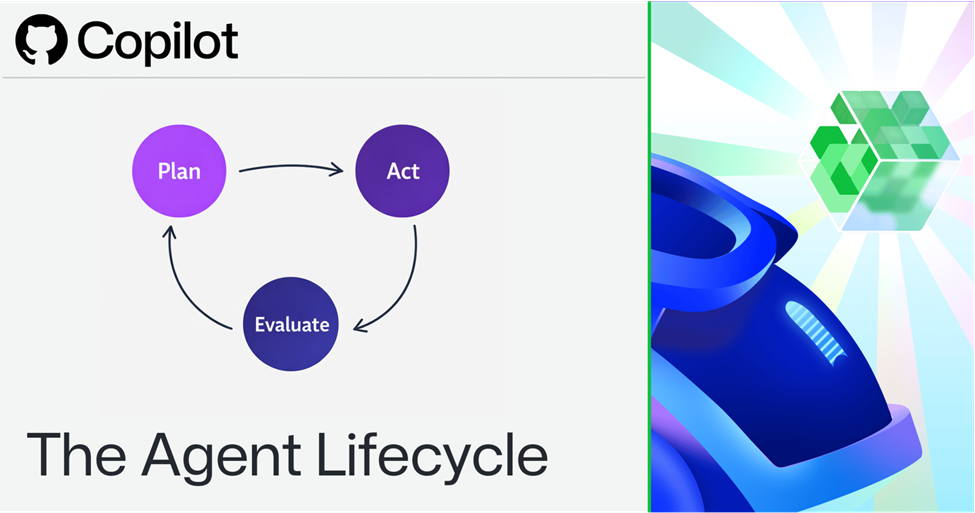
Agent workflows follow a plan → act → evaluate loop, where each cycle uses system feedback to refine the next step until the outcome meets required standards. This module gives you the foundation you need to understand that shift. You’ll learn what makes a system “agentic,” how agents differ from traditional assistants, and how they operate inside GitHub. You’ll also see how GitHub acts as both the system of record and the control plane, using familiar tools like pull requests, reviews, status checks, CODEOWNERS, rulesets, and environments to keep agent activity safe and controlled.
In this module we cover:
- Define agentic AI in the SDLC and distinguish agents from assistants
- Explain and apply the plan → act → evaluate lifecycle in agent workflows
- Describe how GitHub functions as the system of record and control plane for agent activity
- Identify responsibilities, risks, anti-patterns, and traceability requirements in agent systems
- Apply the contributor model to evaluate agent-generated work
Here are other modules for more learning about Developing in Agentic AI Systems:
Unit 2: Define agentic AI in the SDLC
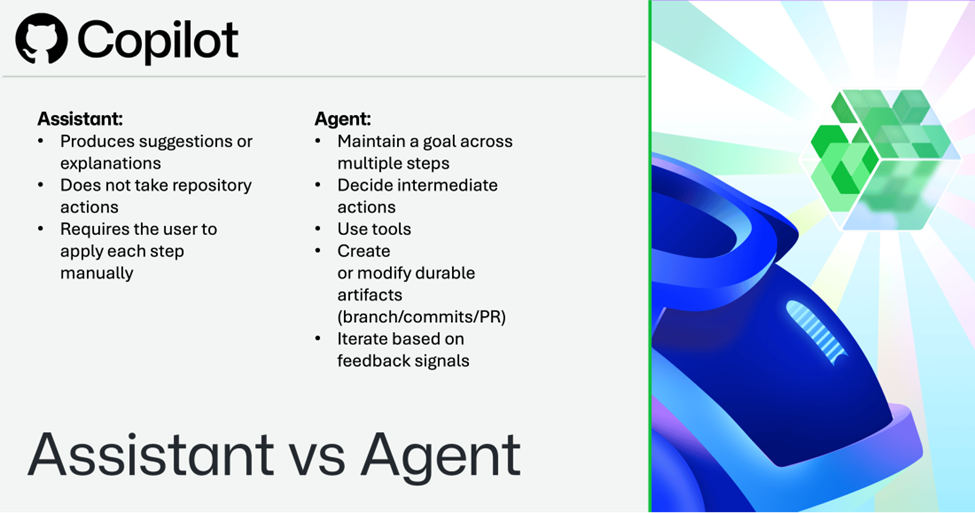
Section titled “Unit 2: Define agentic AI in the SDLC”Many developers already use AI in a familiar assistant pattern. An assistant responds to a prompt, generates output, and returns control to the user. An agent goes further: it can interpret a goal, decide on intermediate steps, use tools, and take action inside a workflow.
That difference matters because it changes AI from something that helps with development into something that participates in development.
In this unit, you’ll learn
Section titled “In this unit, you’ll learn”- What makes an AI system agentic in a development context
- How agent-based systems differ from assistant-based systems
- How agent behavior appears inside GitHub workflows
What makes an AI system agentic in a development context.
Section titled “What makes an AI system agentic in a development context.”Assistant-based systems are typically reactive:
- They depend on a user to decide what to do next.
- They may suggest code, explain output, or summarize changes.
- They don’t independently move work forward inside a repository.
Agent-based systems are goal-driven:
- They can interpret a task, develop an approach, and take steps toward completion.
- They can use tools (for example, the GitHub API, CI workflows, or repository write operations) to produce durable outcomes such as branches, commits, and pull requests.
- They can iterate based on feedback (checks, reviews, scans).
In GitHub, this model is often expressed through a pull-request-oriented workflow: the agent proposes changes on a branch, opens a pull request, and waits for review and validation before the change is merged.
Assistant versus agent?
Section titled “Assistant versus agent?”It is behaving like an assistant when it:
- Produces suggestions or explanations
- Does not take repository actions
- Requires the user to apply each step manually
An AI system is behaving like an agent when it can:
- Maintain a goal across multiple steps
- Decide intermediate actions
- Use tools
- Create or modify durable artifacts (branch/commits/PR)
- Iterate based on feedback signals
How agent behavior appears in GitHub
Section titled “How agent behavior appears in GitHub”In GitHub, agent behavior is visible through the same structures developers already use:
- Branches and commits (what changed)
- Pull requests (what is proposed, why, and for review)
- Workflows and checks (what evidence exists)
- Review comments and approvals (what humans accepted or rejected)
An agent does not replace the workflow. It enters the workflow as a participant.
Implementation examples
Section titled “Implementation examples”Agent behavior (PR-producing) A security alert is filed. The agent:
- Creates a branch (for example, agent/bump-dep-2026-04-03)
- Updates a dependency and lockfile
- Opens a pull request with a summary and plan
- Waits for CI checks and review feedback, then revises if needed
Assistant behavior (suggestion-only) You ask an assistant: “How do I safely update this dependency?” The assistant gives:
- a set of recommended commands
- a checklist of risks
- suggested code changes You still create the branch and pull request yourself.
In the next unit, you’ll examine the lifecycle that governs how agents plan, act, and evaluate.
Unit 3: Explain the agent lifecycle - plan, act, evaluate
Section titled “Unit 3: Explain the agent lifecycle - plan, act, evaluate”Agentic systems don’t make one decision and stop. They operate through cycles. A foundational model is the lifecycle of plan → act → evaluate. This lifecycle isn’t a one-time sequence. It’s a loop: agents repeatedly plan, act, and evaluate until the task meets defined success criteria.
In this unit, you’ll learn
Section titled “In this unit, you’ll learn”- How the plan → act → evaluate lifecycle works in practice
- How planning, action, and evaluation are implemented in GitHub workflows
- How feedback signals drive iteration and completion
In the planning phase, the agent interprets the goal and determines what steps are needed to complete it. In high-quality systems, plans aren’t hidden internal states. They’re structured, reviewable artifacts that make the approach understandable and assessable.
Examples of planning artifacts in GitHub include:
- A structured plan in the pull request description
- A linked issue or checklist outlining scope and success criteria
Tip
Plans become more reviewable when they include scope (what will change), success criteria (how you’ll know it worked), and a rollback or escalation path.
In the action phase, the agent executes the plan in the repository. This can include:
- Creating a branch
- Changing files and pushing commits
- Opening or updating a pull request
- Responding to review feedback with revisions
This matters because it keeps execution bounded: actions occur in a specific repository, on a branch, and through pull request workflows rather than through uncontrolled direct changes to the default branch.
Evaluate
Section titled “Evaluate”In the evaluation phase, the agent and the humans supervising it use signals from the development system to assess results. In GitHub, common evaluation signals include:
- Workflow runs and status checks (build/test/lint)
- Code review feedback (requested changes, approvals)
- Security signals (code scanning results, secret scanning alerts, dependency alerts)
When configured by repository or organization policy, protections such as rulesets and branch protection can require checks to pass before changes merge-turning evaluation into an enforceable gate rather than an informal suggestion.
For security-oriented work, evaluation often includes:
- Code scanning (including SARIF upload workflows)
- Secret scanning alerts
- Push protection to prevent supported secrets from being committed
These capabilities reinforce a key lesson: agent evaluation must be grounded in system signals, not in the agent’s confidence.
Evaluation isn’t the final step. If checks fail, risks remain, or requirements aren’t met, the lifecycle continues: the agent must revise the plan, adjust its actions, and reevaluate until the outcome is acceptable or handed off to a human.
For example, when an agent proposes a dependency update in a pull request, the plan defines which package changes, the action updates the files, and evaluation occurs through CI checks and security signals.
If workflows fail or the vulnerability remains unresolved, the work isn’t complete. The lifecycle must loop: revise the plan, adjust the change, or escalate to a human.
A high-quality agent system makes every phase visible
Section titled “A high-quality agent system makes every phase visible”- The plan is inspectable.
- Action is bounded to repository workflows.
- Evaluation uses objective signals.
When any piece is missing, trust degrades: plans become opaque, actions become risky, and outcomes become difficult to validate.
The lifecycle of planning, acting, and evaluating is the operational core of agentic systems. It explains how agents move from intent to execution -and how GitHub’s checks, workflows, reviews, and security signals provide feedback that enables safe iteration.
Once you understand how an agent behaves, the next question becomes where that behavior is controlled. In the next unit, you’ll examine GitHub as the system of record and control plane for agent workflows.
Unit 4: Describe GitHub as the system of record and control plane
Section titled “Unit 4: Describe GitHub as the system of record and control plane”Agentic systems need an environment that does more than store code. They need an environment that can capture intent, record actions, enforce validation, and apply policy. In this learning path, GitHub is that environment.
In this unit, you’ll learn
Section titled “In this unit, you’ll learn”- What it means for GitHub to act as a system of record for agent workflows
- How GitHub enforces control through repository policies and workflows
- Which GitHub controls are used to supervise and constrain agent behavior
GitHub as the system of record
Section titled “GitHub as the system of record”GitHub is the system of record because it stores the artifacts through which development work is proposed and evaluated:
- Repositories and branches
- Commits and pull requests
- Issues and discussions (context and intent)
- Workflow runs and artifacts (evidence)
- Review history (decisions)
In an agentic workflow, these artifacts do double duty: they support development and make agent behavior inspectable after the fact.
Note
This module focuses on general GitHub governance patterns. GitHub Advanced Security features such as secret scanning and push protection aren’t covered here, but can be integrated as additional validation signals in production environments.
GitHub as the control plane
Section titled “GitHub as the control plane”GitHub is the control plane because (when configured by policy) it provides enforcement points that shape what agent contributions can and can’t do.
Controls at a glance
Section titled “Controls at a glance”| GitHub control | What it enforces | Why it matters for agents |
|---|---|---|
| Pull requests | Changes are proposed before merging | Makes agent work reviewable and discussable |
| Required reviews | Human and agent approval gate | Prevents unreviewed merges and supports accountability |
| Required status checks | CI evidence before merging | Converts evaluation into enforceable policy |
| CODEOWNERS | Review routing by path | Ensures the right experts supervise high-impact changes |
| Rulesets / branch protection | Centralized branch policy | Prevents unsafe merges and enforces consistent guardrails |
| Environments | Approvals for deployments/secrets | Controls sensitive execution and secret access |
Note
These enforcement behaviors depend on configuration and permissions. For example, enabling required checks and rulesets is typically an admin task. The supervision model works everywhere; enforcement requires the controls to be turned on.
GitHub Actions belongs in the control plane
Section titled “GitHub Actions belongs in the control plane”Workflows are where execution is validated, but permissions matter as much as checks. A key security principle is least privilege:
- Set default workflow token permissions conservatively (for example, read-only where possible).
- Grant higher permissions only to the jobs that need them.
- Use environments and approvals to control access to sensitive secrets and deployments.
For agentic systems, “what the agent can do” often reduces to “what the workflow token and tool credentials can do.” Controls and permissions must be designed accordingly.
Implementation examples
Section titled “Implementation examples”- Workflow execution is gated by humans In some agent PR workflows, a human may need to explicitly approve running workflows (for example, an “Approve and run workflows” action). This is a built-in guardrail: it reduces the risk of privileged workflows running automatically for untrusted changes.
- Environments gate secrets and deployments If a workflow job targets an environment with required reviewers, the job waits until approval is granted. This prevents an agent-triggered workflow from accessing protected secrets or deploying without human review (when configured).
- CODEOWNERS routes reviews for high-risk paths If the agent changes files in a sensitive path (for example, .github/workflows/ or infra/), CODEOWNERS can automatically request review from the owners of those paths. When combined with required reviews, this helps ensure the right experts supervise high-impact changes.
How GitHub enforces control in practice
Section titled “How GitHub enforces control in practice”The agent opens a pull request with a security fix. GitHub:
- Makes the change visible in the PR
- Routes it to the right reviewers via CODEOWNERS (when configured)
- Evaluates it through required checks and workflows
- Blocks merging until policy requirements are satisfied (when configured)
- Prevents access to protected environment secrets until approvals are granted (when configured)
This is what it means to say GitHub is the control plane: it’s where enforcement happens.
GitHub isn’t just where agent work is stored. It’s where agent work is supervised, validated, and governed. Repositories and pull requests make work visible; checks, reviews, CODEOWNERS, rulesets, branch protection, and environments make work controllable.
Now that you’ve seen how GitHub can constrain and validate agent behavior, the next step is to examine responsibility. In the next unit, you’ll look at who remains accountable when agents act inside a workflow.
Unit 5: Identify responsibilities, risks, anti-patterns, and traceability needs
Section titled “Unit 5: Identify responsibilities, risks, anti-patterns, and traceability needs”As agents become more capable, it can be tempting to imagine responsibility shifts to the system. It does not. Agentic systems may execute work, but humans remain accountable for outcomes and for the controls that govern execution.
In this unit, you’ll learn
Section titled “In this unit, you’ll learn”- Who is accountable for agent actions and outcomes
- What common risks and anti-patterns appear in agent systems
- How GitHub controls mitigate these risks
- Why traceability and observability are required for trustworthy systems
Responsibility does not move with execution
Section titled “Responsibility does not move with execution”When an agent creates a pull request, revises code, or responds to feedback, it participates in the workflow, but it does not assume ownership of outcomes. The accountable parties are still the people and teams who:
- Defined the task
- Set permissions
- Choose and configured controls
- Approved the resulting change
A pull request review model makes this explicit: the system can propose, but humans decide what is accepted.
Common risks and anti-patterns
Section titled “Common risks and anti-patterns”Early-stage agent systems commonly fail in predictable ways:
- Planless execution: The agent begins changing code without a clear, inspectable approach.
- Over-permissioned agents: The agent (or its workflow token/tooling credentials) has broader access than necessary.
- Hidden reasoning: The workflow exposes only outputs (the diff) without intermediate artifacts (plan, assumptions, decision points, execution context).
- Blind trust in automation: Passing CI matters, but checks only validate what they’re designed to detect. A passing build does not automatically mean the change is complete, appropriate, or low risk.
Implementation mapping: risk → GitHub mitigation
Section titled “Implementation mapping: risk → GitHub mitigation”| Risk / anti-pattern | What it looks like in GitHub | Mitigation using GitHub controls |
|---|---|---|
| Planless execution | PR has a diff but no plan or rationale | Require a plan section via PR template; require review before merge |
| Over-permissioned agents | Workflows can write to repo, access secrets broadly | Least-privilege GITHUB_TOKEN; environments with required reviewers; restrict who can trigger workflows |
| Hidden reasoning | No assumptions/scope/decision trail | Require plan and link workflow runs and record decisions in PR comments |
| Blind trust in automation | “CI passed, ship it” mindset | Combine checks with CODEOWNERS, required reviews, and risk-based approvals |
Traceability and observability
Section titled “Traceability and observability”To supervise an agent well, you need more than a final diff-you need a trail. In GitHub, that trail can include:
- Pull requests and commit history
- Review comments and approvals
- Workflow runs and uploaded artifacts (test reports, logs)
- Code scanning uploads and alerts
- Secret scanning alerts and push protection events
- Organization audit log events (availability and access depends on org/enterprise configuration)
The goal isn’t only compliance. It is operational understanding: when something fails, you need to know what changed, who approved it, what evidence existed, and what happened next.
Minimum audit trail for agent contributions
Section titled “Minimum audit trail for agent contributions”- A stated goal (issue link or PR description)
- An inspectable plan (PR plan section or file)
- A bounded changeset (branch and commits)
- Automated evidence (workflow run and artifacts)
- Human judgment (review and approval)
- A clear outcome (merge, revert, or escalation)
Suppose the agent’s vulnerability fix passes CI but later causes a regression. The key question isn’t only whether the agent made a mistake-it’s whether the system made the mistake understandable and preventable:
- Was there a visible plan and scope?
- Were the right reviewers requested (and did they approve)?
- Did the checks match the risk of the change?
- Is the audit trail sufficient to reconstruct what happened?
Agentic systems change who performs work, but not who owns outcomes. Human teams remain accountable, which is why they must design against common anti-patterns and require strong traceability through GitHub-native artifacts and logs.
Once you understand how responsibility works, the final step is to decide how agent work should be judged. In the next unit, you’ll apply the contributor model to agent-generated output.
Unit 6: Apply the contributor model to agent-generated work
Section titled “Unit 6: Apply the contributor model to agent-generated work”A reliable way to evaluate agent output is to stop treating it as categorically different from normal development work. Instead, treat it as a contribution.
In this unit, you’ll learn
Section titled “In this unit, you’ll learn”- How the contributor model applies to agent-generated pull requests
- How to evaluate agent contributions using standard development criteria
- What a high-quality, well-supervised agent contribution looks like
The contributor model
Section titled “The contributor model”In GitHub, a pull request is the natural unit of contribution. Whether the author is a human developer or an agent, the pull request should answer the same questions:
- Does the change solve the intended problem?
- Is the scope appropriate and explained?
- Do required checks and validations pass?
- Are the right owners reviewing the affected areas?
- Does the change align with standards, architecture, and policy?
This model avoids two opposite errors:
- Excessive suspicion: rejecting work because “AI wrote it.”
- Excessive trust: accepting work because automation produced it.
The contributor model says: evaluate the work by the standards of the workflow, not by the novelty of the author.
Practical review rubric for agent PRs
Section titled “Practical review rubric for agent PRs”When you review an agent PR, check:
- Intent: Is there a clear goal and a visible plan?
- Scope: Are the files changed aligned with the plan?
- Evidence: Do required checks pass? Are logs/artifacts available if needed?
- Ownership: Did the CODEOWNERS review sensitive areas (when configured)?
- Policy: Does it comply with rulesets/branch rules/environments (when configured)?
- Fallback: Is rollback or escalation clear for high-risk changes?
Evaluating agent-generated pull requests
Section titled “Evaluating agent-generated pull requests”When the agent submits a pull request, updates a dependency and modifies configuration files under a contributor model; you don’t ask only whether the code compiles. You ask whether:
- the extra changes are justified,
- the checks cover the risk introduced,
- the right owners reviewed the affected areas, and
- the change aligns with repository and deployment policies.
What good looks like
Section titled “What good looks like”A well-supervised agent contribution is:
- Understandable (clear goal and plan)
- Bounded (scoped changeset, least privilege)
- Reviewable (right owners involved, evidence present)
- Policy-compliant (rulesets/branch rules/environments respected)
- Reconstructable (audit trail supports post-hoc analysis)
This is not a special standard for AI. It’s the standard of a healthy engineering workflow applied consistently.
Treating agents as contributors helps preserve engineering discipline. It keeps evaluation grounded in pull requests, checks, reviews, repository policy, and human judgment rather than in hype or fear.
Unit 8: Summary
Section titled “Unit 8: Summary”In this module, you:
- Built a working definition of agentic AI in the SDLC and learned how agents differ from assistants.
- Learned how agents show up in GitHub as contributors through branches, pull requests, workflow runs, and reviews.
- Practiced the plan → act → evaluate lifecycle as the core model for agent execution and iteration.
- Learned how GitHub serves as a system of record and a control plane, using controls like rulesets/branch protection, required checks, required reviews, CODEOWNERS, and environments (when configured).
- Identified common risks and anti-patterns, and learned how traceability plus a contributor-based review model helps you evaluate agent work reliably.
Learn more
Section titled “Learn more”For deeper reading, use official GitHub documentation on:
- Reviewing a pull request created by GitHub Copilot
- Creating rulesets for a repository and About protected branches (branch protection rules)
- About code owners (CODEOWNERS)
- Use GITHUB_TOKEN for authentication in workflows
- Uploading a SARIF file to GitHub (code scanning)
- About push protection (secret scanning)
- Audit log for an enterprise (availability depends on organization/enterprise configuration)
Module 2: Designing Agent Architecture and SDLC Integration
Section titled “Module 2: Designing Agent Architecture and SDLC Integration”Learn how agentic systems use GitHub workflows to build software safely.
Learning objectives
Section titled “Learning objectives”By the end of this module, you will be able to:
- Map agent responsibilities to SDLC stages and define architectural boundaries
- Define structured agent tasks using inputs, outputs, and success criteria
- Separate planning, reasoning, and execution to create inspectable and reliable workflows
- Implement pull request-based governance using templates, checks, CODEOWNERS, rules, and environments
- Design reliable workflows using outputs, contexts, triggers, and cross-job handoffs
- Operate agent systems safely using observability, tool governance, secrets boundaries, hooks, and reliability patterns
Unit 1: Introduction
Section titled “Unit 1: Introduction”
Agentic systems are changing how software is built and maintained. Instead of relying only on developers to write and update code, teams are adopting systems that can interpret goals, propose solutions, and take action within repositories. In GitHub, an agent might create a branch, modify files, open a pull request, and then iterate based on feedback from tests, security scans, and code reviews.
However, capability alone doesn’t make an agent reliable. Without a well-defined architecture, agents may act too early, produce unclear changes, or operate without sufficient validation. In production environments, these failures create real risks to code quality, security, and operational stability.
Designing an agent system in GitHub isn’t about giving the agent more freedom. It’s about defining how work flows through the system using enforceable GitHub functions such as pull requests, workflows, and repository rules. A well-designed architecture ensures that every agent action leaves a visible record, is validated by objective signals, and is accepted only when it meets policy requirements.
Glossary
Section titled “Glossary”Key terms and definitions
This module uses a small set of recurring terms. The definitions below clarify how they’re used throughout the content.
- Plan (artifact) A structured description of intended changes, typically included in a pull request description. It outlines the goal, scope, steps, risks, and validation criteria for the work.
- Planning (agent capability) The process by which an agent generates or refines a plan based on a task, issue, or user input. This can occur in different entry points, such as a GitHub issue or the Agents interface.
Unit 2: Map agent responsibilities to the SDLC
Section titled “Unit 2: Map agent responsibilities to the SDLC”In this unit, you will learn:
- Why mapping agent responsibilities to SDLC stages improves reliability
- How SDLC stages map to GitHub artifacts and control surfaces
- Define architectural boundaries for agent behavior to reduce risk and improve auditability
Why responsibility mapping matters
Section titled “Why responsibility mapping matters”Agent systems should not operate across the entire SDLC without restriction. When an agent is treated like a general-purpose developer, it becomes difficult to reason about its behavior, limit its impact, or audit outcomes.
A more reliable approach is to map the agent to specific lifecycle stages where GitHub can enforce boundaries. Most teams start by scoping agents to the implementation and validation stages, where pull requests and workflows provide natural control points.
Mapping SDLC stages to GitHub artifacts
Section titled “Mapping SDLC stages to GitHub artifacts”The SDLC can be simplified into planning, implementation, validation, and deployment. Each stage maps to a different GitHub “surface” where work and evidence can be recorded.
| SDLC stage | Typical agent responsibility in GitHub | Primary artifact |
|---|---|---|
| Planning | Draft scope, plan steps, define success criteria | GitHub Issues, pull request descriptions/comments, Agents tab |
| Implementation | Create branch, make changes, open/update PR | Branch, commits, pull request |
| Validation | Run checks, attach artifacts, iterate on failures | Workflow runs, checks, artifacts |
| Deployment | Usually restricted; require approvals for sensitive actions | Environments and deployment approvals |
Define architectural boundaries for agent behavior to reduce risk and improve auditability
Section titled “Define architectural boundaries for agent behavior to reduce risk and improve auditability”- Scope early to reduce blast radius: limit which directories an agent can modify by policy and ownership.
- Treat workflow and infra changes as higher risk than application code changes.
- Prefer PR-based work even for automation; avoid direct-to-default-branch changes.
A common design boundary is: agents propose; humans and policy accept. The agent can prepare work and submit it through a pull request, but repository policy and human reviewers decide whether that work is merged or deployed.
Practical example in GitHub
Section titled “Practical example in GitHub”A dependency remediation agent is scoped to implementation:
- The agent detects a vulnerable dependency (for example, from a security alert or an issue).
- The agent creates a branch.
- The agent updates the dependency and lockfile.
- The agent opens a pull request that includes a structured plan and expected success signals.
At that point, the agent’s scoped responsibility can be considered complete. Validation and acceptance happen through checks, reviews, and policy controls.
Unit 3: Define inputs, outputs, and success criteria
Section titled “Unit 3: Define inputs, outputs, and success criteria”In this unit, you’ll learn:
- How to define structured agent tasks using inputs, outputs, and success criteria
- Review examples of a task contract and a workflow that can define success criteria for an agent
Task structure makes outcomes predictable
Section titled “Task structure makes outcomes predictable”Each agent task should be defined in terms of:
- Inputs: what the agent needs (issue context, constraints, boundaries).
- Outputs: what the agent produces (plan + PR + evidence).
- Success criteria: how results are evaluated (checks, scans, review outcomes).
When tasks are under-specified, agents can produce changes that look plausible but don’t actually solve the underlying problem.
Example task contract: vulnerability remediation
Section titled “Example task contract: vulnerability remediation”Inputs
- A security alert or issue link describing the vulnerability.
- Repository scope: changes allowed under src/ and dependency files, but not infra/ unless explicitly requested.
- Constraints: no workflow changes without platform review; no secrets introduced; no direct-to-main pushes.
Outputs
-
A pull request containing:
- a structured plan (in PR description or Github/pull_request_template.md)
- a bounded changeset (commits on an agent branch)
- And evidence links to workflow run
Success criteria
- Required checks pass (build/test/lint).
- Security signal is resolved (for example, the vulnerable version is replaced).
- Scope matches intent (no unexpected files changed).
- A rollback or escalation path is recorded for higher-risk changes.
Tip
“CI passed” is necessary, but not always sufficient. Make success criteria reflect the real intent of the task (for example, “vulnerability resolved” rather than “tests passed”).
Implementation example: CI validation as an enforceable success signal
Section titled “Implementation example: CI validation as an enforceable success signal”The following workflow is a common way to turn success criteria into a required status check.
on:  pull_request:    branches: [ main ]
jobs:  test:    runs-on: ubuntu-latest    steps:      - uses: actions/checkout@v4      - run: npm test
  security-analysis:    runs-on: ubuntu-latest    permissions:      contents: read      security-events: write    steps:      - uses: actions/checkout@v4      - name: Initialize analysis        uses: github/codeql-action/init@v3      - name: Analyze        uses: github/codeql-action/analyze@v3
When this workflow is configured as a required check (via rulesets or branch protection), a pull request can’t be merged until the check passes. This ensures that success is enforced by the system-not assumed by the agent.
If success criteria are vague or missing, an agent may “complete the task” in a way that looks correct but fails the underlying goal. For example, the agent might update a dependency but leave the vulnerable version reachable through a transitive dependency or make broad changes that are difficult to validate.
With tasks defined, the next step is to design how the agent plans and executes its work in a way that remains reviewable.
Unit 4: Separate planning, reasoning, and execution
Section titled “Unit 4: Separate planning, reasoning, and execution”In this unit, you will learn:
- Why separating planning, execution, and validation improves reliability
- Understanding the difference between a plan-first and a plan + execution workflows
- How to enforce planning boundaries using capability limits and tool gating
Why separation improves reliability
Section titled “Why separation improves reliability”Reliable agent systems separate:
- Planning: what will be done and why.
- Execution: the concrete changes made to the repository.
- Validation: evidence that the outcome meets success criteria.
When planning and execution are mixed together, reviewers see only the final diff. They lose the ability to validate intent early, detect misunderstandings quickly, and control scope before impact.
How separation maps to GitHub
Section titled “How separation maps to GitHub”GitHub naturally supports this separation:
- Planning appears in a PR description, an issue comment, or a Github/pull_request_template.md artifact.
- Execution appears as commits on a branch.
- Validation appears as checks, scans, artifacts, and review outcomes.
Understanding the difference between a plan-first workflow and a plan + execution workflow
Section titled “Understanding the difference between a plan-first workflow and a plan + execution workflow”When working with agents, teams must decide when a plan becomes visible and when code changes are allowed to begin. In GitHub, planning and execution can start from different entry points-such as a GitHub issue (for example, assigning a Copilot Cloud Agent), or through the Agents tab where a plan is generated interactively.
These are separate ways of interacting with the agent, but they converge on the same governance model: all work is ultimately surfaced and reviewed in a pull request (PR)
The key design choice is therefore not where the plan starts, but when human validation is required relative to code changes.
Option A: Plan-first pull request
Section titled “Option A: Plan-first pull request”In this approach, planning is completed and approved before any code changes are introduced.
How it works in practice:
- A plan is generated (for example, by assigning an agent to a GitHub issue or creating it in the Agents tab).
- The agent opens a pull request that contains only the plan (no code changes yet).
- Reviewers discuss, refine, and approve the plan directly in the PR.
- After approval, the agent proceeds to implement the plan in follow-up commits or a new PR.
This creates a clear separation between intent (plan) and execution (code).
Option B: Plan + execution in the same pull request
Section titled “Option B: Plan + execution in the same pull request”In this approach, planning and execution are combined within a single PR.
How it works in practice:
-
The agent opens a PR that includes both:
- a structured plan (in the description)
- initial code changes (commits)
-
The agent may continue updating the PR as the plan evolves.
-
Standard GitHub controls-required checks, CODEOWNERS reviews, and branch protection-prevent merging until all requirements are satisfied.
Here, the plan is still visible, but it is presented alongside active changes rather than before them.
Key difference: Timing of validation
Section titled “Key difference: Timing of validation”Both options use the same GitHub controls. The difference is when those controls are applied relative to execution:
- Option A (Plan-first): Human validation happens before any code is written.
- Option B (Plan + execution): Code is generated immediately, but validation is still required before merge.
Risk considerations
Section titled “Risk considerations”Both approaches can be safe when GitHub protections are correctly configured. The difference lies in when risk is introduced into the system:
-
Option A reduces early exposure. Since no code is generated before approval, reviewers validate intent first. This minimizes unnecessary or unsafe changes and is preferred in high-risk environments (for example, production systems or security-sensitive areas).
-
Option B introduces earlier exposure to change. Code appears in the PR before the plan is fully validated. While this code cannot be merged without approval, it may:
- introduce unnecessary or incorrect changes that must be reviewed and rejected
- increase reviewer effort
- create temporary misalignment between plan and implementation
Importantly, this risk exists during the proposal stage, not after merge. GitHub’s enforcement mechanisms still prevent unsafe code from being deployed.
When to use each option
Section titled “When to use each option”-
Use Plan-first workflow when:
- changes are high-risk or difficult to reverse
- alignment on intent is critical before execution
- you want strict separation between planning and implementation
-
Use Plan and execution workflow when:
- speed and iteration are more important
- changes are low-risk or easily reversible
- reviewers are comfortable evaluating plan and code together
Key takeaway
Section titled “Key takeaway”The choice is not whether work is reviewed-it always is. The choice is when the system allows code to be generated relative to human validation, and how early you want to introduce change into the workflow.
Enforcing planning boundaries using capability limits and tool gating
Section titled “Enforcing planning boundaries using capability limits and tool gating”- Capability boundary (planning agents are read-only) A planning agent should be limited to read-only tools so it cannot modify files during planning.
- Explicit transition (or handoff) to an implementation agent. Execution should occur only after plan approval, using a deliberate handoff.
- Tool gating in orchestrators in automated orchestrations, you can force planning to run without tool execution and then enable tools only after the plan is accepted.
- “Plan mode” workflows - Some interfaces support a planning-first experience that generates a plan artifact and pauses before any changes are applied.
Decision guidance
Section titled “Decision guidance”- Use plan-first for high-risk work (workflows, infra, auth, production).
- Use plan + execution for medium/low risk work, but keep checks/reviews required.
- Treat “instructions not to edit” as guidance; treat tool allowlists and gates as enforcement.
Key takeaway: Separation creates an opportunity to review intent before accepting impact.
Next, you will enforce plan visibility and validation through pull request approval gates.
Unit 5: Examples of implementing PR governance with templates, checks, CODEOWNERS, rules, and environment gates
Section titled “Unit 5: Examples of implementing PR governance with templates, checks, CODEOWNERS, rules, and environment gates”In this unit, you’ll learn:
- How pull requests act as architectural control points for agent execution
- How to enforce plan validation with required checks status checks
- How to use CODEOWNERS and reviews to route and approve changes
Pull requests are architectural control points
Section titled “Pull requests are architectural control points”Pull requests are the primary control mechanism for agent execution in GitHub. Instead of allowing direct changes to protected branches, well-designed architectures route agent changes through pull requests and enforce merge requirements through policy.
A common safe workflow looks like this:
Agent creates branch
    ↓
Agent opens pull request (includes plan)
    ↓
Required reviews validate approach
    ↓
GitHub Actions run required checks
    ↓
All checks pass + approvals complete
    ↓
Pull request can be merged
This structure ensures that execution is gated by both automation and human review.
Implementation: PR template that requires a structured plan
Section titled “Implementation: PR template that requires a structured plan”A pull request template ensures that every agent PR provides consistent plan and evidence sections.
## Plan (required)- **Goal:**- **Scope (paths/files):**- **Steps:**  1.  2.  3.- **Success criteria (verifiable):**  - [ ] Required checks pass  - [ ] Security signals reviewed (as applicable)- **Risks + mitigations:**- **Rollback / escalation plan:**
## Evidence- Workflow run(s):- Scan results (if applicable):
## Review checklist- [ ] Plan reviewed and approved- [ ] Required reviews satisfied- [ ] Required checks satisfied
Enforcing plan validation with required checks status checks
Section titled “Enforcing plan validation with required checks status checks”In addition to templates, you can enforce plan gating as a required status check. This turns a process expectation (“include a plan”) into a system guarantee.
name: Plan Gate
on:  pull_request:    branches: [ main ]
jobs:  require-plan:    runs-on: ubuntu-latest    steps:      - uses: actions/checkout@v4
      - name: Require plan artifact        run: |          if [ ! -f "Github/pull_request_template.md" ]; then            echo "Github/pull_request_template.md is required for this pull request."            exit 1          fi          echo "Github/pull_request_template.md found."
Implementation note:
A repository administrator can mark Plan Gate as a required status check using rulesets/branch protection, ensuring PRs can’t merge unless the plan exists.
GitHub can require explicit approval before workflows run on agent-generated changes.
Using CODEOWNERS to ensure safety
Section titled “Using CODEOWNERS to ensure safety”CODEOWNERS ensures that changes to sensitive areas go to the right reviewers automatically.
# File: CODEOWNERS
/security/ @security-team/.github/workflows/ @platform-team/infra/ @platform-team* @core-team
This ensures that a plan and changeset affecting high-risk paths can’t be merged without visibility from the right experts (when combined with required review policies).
Be wary of execution without validation
Section titled “Be wary of execution without validation”If an agent can bypass required checks or merge without reviews, the architecture loses its primary safety mechanisms. This is less a model problem and more a workflow design failure.
Key takeaway: Pull requests aren’t just collaboration tools-they are enforcement mechanisms.
Next, you’ll define how much autonomy the agent should have based on the risk of the task.
Unit 6: Build reliable workflows - outputs, contexts, triggers, and cross-job handoffs
Section titled “Unit 6: Build reliable workflows - outputs, contexts, triggers, and cross-job handoffs”In this unit, you’ll learn:
- How to pass data through workflows using step and job outputs
- How to use GitHub contexts for configuration and control
- How to design workflows with safe triggers and defensive gating
- How to ensure workflows run only in the correct context
- How to build reliable workflows using structured data and event logic
Autonomy must be designed, not assumed
Section titled “Autonomy must be designed, not assumed”Different tasks carry different risks. A good agent architecture uses policy to express different autonomy levels rather than applying the same rules everywhere.
A simple risk-based autonomy model might look like this:
| Task type | Example paths | Risk level | Autonomy design |
|---|---|---|---|
| Low | docs/, formatting | Low | merge can be automated using GitHub automerge after required checks (and reviews, if configured) pass |
| Medium | src/, dependency bumps | Medium | PR required + checks + at least one review |
| High | infra/, .github/workflows/ | High | CODEOWNERS + multiple reviews + stricter rulesets |
| Critical | production deploys settings, secrets | Critical | environment approvals; agent prepares but can’t execute |
Implementation: environment approvals for high-risk execution
Section titled “Implementation: environment approvals for high-risk execution”Environments provide a strong control point for risky actions such as deployments and access to protected secrets. If an environment is configured with required reviewers, a job targeting that environment will pause until approval is granted.
jobs: deploy: runs-on: ubuntu-latest environment: name: production steps: - run: echo "Deploying to production..."This design allows the agent to prepare changes while preventing it from executing production-impacting actions independently.
Outputs are workflow contracts (step outputs vs job outputs vs env)
Section titled “Outputs are workflow contracts (step outputs vs job outputs vs env)”When a workflow generates information that downstream steps or jobs must consume, treat that data as an explicit output rather than “just logs.”
Teach and apply these principles:
- Step outputs pass values between steps in the same job.
- Job outputs pass values across jobs (through job dependencies).
- Environment variables configure runtime behavior but shouldn’t replace outputs for structured data flow.
Illustrative pattern (mechanics shown, but not exam-shaped):
- id: generate_plan  run: |    echo "plan=high level steps..." >> "$GITHUB_OUTPUT"
- run: |    echo "Plan: ${{ steps.generate_plan.outputs.plan }}"
For cross-job sharing, publish a job output and reference it from a dependent job:
jobs:  plan:    outputs:      plan: ${{ steps.generate_plan.outputs.plan }}    steps:      - id: generate_plan        run: echo "plan=..." >> "$GITHUB_OUTPUT"
  implement:    needs: plan    steps:      - run: echo "Using plan: ${{ needs.plan.outputs.plan }}"
Contexts: GitHub vs vars vs env
Section titled “Contexts: GitHub vs vars vs env”Use the right context for the right purpose:
- github.* → event metadata and runtime decisions (“what triggered this run?”)
- vars.* → centrally managed configuration values designed to be reused
- env.* → job-level environment variables and runtime configuration
Safe triggering and defensive gating
Section titled “Safe triggering and defensive gating”Even when workflows are designed for PRs, repositories often have multiple triggers. Add defensive gating so “PR-only” behavior doesn’t accidentally run without a PR context.
General pattern to teach:
- Use job-level conditions to ensure PR-dependent actions only run when the run is tied to a PR event.
Defensive gating for pull request-only behavior
Section titled “Defensive gating for pull request-only behavior”Even if a workflow is intended to run only for pull requests, it may still be triggered by other events (for example, push, workflow_dispatch, or schedule). Without additional safeguards, PR-specific steps-such as commenting on a pull request or evaluating changes-can fail or behave unexpectedly.
You can prevent this by adding a job-level condition that ensures the workflow only runs when it’s associated with a pull request.
name: PR Validation
on:  pull_request:    branches: [ main ]  workflow_dispatch: # allows manual runs, but still gated below
jobs:  validate-pr:    # Defensive gating: only run if this is actually a PR context    if: github.event_name == 'pull_request'
    runs-on: ubuntu-latest
    steps:      - uses: actions/checkout@v4
      - name: Run tests        run: npm test
      - name: Comment on PR        run: echo "Validation complete"
Key takeaway: Workflow reliability improves when plans and signals are treated as structured outputs and guarded by event-aware logic.
Section titled “Key takeaway: Workflow reliability improves when plans and signals are treated as structured outputs and guarded by event-aware logic.”Next, you’ll operate agents safely by making runs auditable, controlling tools and secrets, and building hooks-based guardrails and reliability patterns.
Unit 7: Control and operate agents - observability, tools, MCP, secrets, hooks, and reliability
Section titled “Unit 7: Control and operate agents - observability, tools, MCP, secrets, hooks, and reliability”In this unit, you will learn:
- Discover the evidence and artifacts that are required for agent work
- How to control tools, MCP integrations, and secrets safely
- How hooks enforce guardrails and audit logging
- How to design for reliability using retries, escalation, and least privilege
Required evidence and artifacts for agents
Section titled “Required evidence and artifacts for agents”An agent system must produce visible artifacts for every meaningful action. Without artifacts, you cannot reliably review behavior, debug failures, or perform post-hoc analysis.
In GitHub, observability is achieved through artifacts such as:
- pull requests and PR timelines,
- commits and branch history,
- workflow runs and job logs,
- required checks and scan results, and
- uploaded workflow artifacts (for example, test reports).
Minimum observability set
Section titled “Minimum observability set”A well-designed agent task should produce visible, reviewable evidence using GitHub-native artifacts:
- a structured plan, typically included in a pull request description or discussion
- a bounded pull request and commit history
- workflow run links for required checks
- uploaded artifacts (for example, logs or reports)
- review outcomes (approvals or changes requested)
Upload workflow artifacts for review and debugging
Section titled “Upload workflow artifacts for review and debugging”Uploading artifacts makes evidence durable and reviewable, even when logs scroll away.
We recommend the best practice of including links to workflow runs and relevant artifacts in the PR under an “Evidence” section so reviewers can quickly validate outcomes.
- name: Upload test results uses: actions/upload-artifact@v4 with: name: test-results path: results/Reliability assumes failure
Section titled “Reliability assumes failure”Reliable systems assume that failure will occur. Agents will misunderstand tasks, tests will fail, and changes will conflict with existing behavior. Your architecture should detect failures early and provide safe recovery paths.
A practical reliability pattern includes:
- Retries: the agent can update the branch when checks fail.
- Escalation: persistent failures are summarized and handed off to a human.
- Rollback readiness: high-risk changes include rollback notes and scope limits.
Safe iteration policy
Section titled “Safe iteration policy”Use a predictable policy for iteration:
-
If a required check fails, the agent may revise the PR branch and rerun checks.
-
If the same required check fails twice, escalate to a human reviewer with:
- what failed,
- what was attempted,
- what evidence exists, and
- what the suggested next step is.
This policy helps prevent infinite loops and makes failures actionable.
Observability as a required architectural feature
Section titled “Observability as a required architectural feature”A minimum observability set for autonomous work should include:
- a visible plan artifact,
- a PR + commit history,
- workflow run links for required checks,
- durable artifacts (logs/reports/traces),
- review outcomes and approvals.
Make evidence traceable to execution and code state
Section titled “Make evidence traceable to execution and code state”Teach a naming/metadata principle:
- Evidence should be traceable to a specific workflow run and a specific commit.
This helps audits and debugging: you can answer “which run produced this artifact, and against what code state?”
Share evidence across jobs using artifacts
Section titled “Share evidence across jobs using artifacts”Teach the pattern:
- Upload artifacts where they are produced
- Download them where they are reviewed or deployed
This keeps outputs inspectable and usable without committing generated files back to the repo.
How to control tools, MCP integrations, and secrets safely
Section titled “How to control tools, MCP integrations, and secrets safely”Agent profile configuration provides three kinds of control:
- Capability boundary: which tools are allowed (prefer allowlists)
- Visibility boundary: whether the agent is user-selectable in interactive UI
- Delegation boundary: which subagents can be invoked and how handoffs occur Design guidance:
- Use read-only toolsets for planning and review agents.
- Restrict implementation tools to execution agents.
- Treat changes to tool allowlists as a governance-sensitive change.
MCP servers: extend tools safely
Section titled “MCP servers: extend tools safely”MCP servers extend tool capability. Teach these patterns:
- Transport shape: some MCP servers are remote endpoints; others are local processes.
- Authentication: tokens should be injected at runtime via protected secret boundaries.
- Namespace control: prefer enabling a narrow tool subset rather than broad wildcards.
Operational guidance:
- Adding or expanding MCP tools increases blast radius and should be reviewed like a high-risk dependency.
Secrets and environment constraints (keep secrets out of repo content)
Section titled “Secrets and environment constraints (keep secrets out of repo content)”Do not place secrets in:
- instructions files,
- committed configuration files,
- or workflow YAML in plain text.
Instead:
- Use protected secret boundaries intended for runtime injection,
- Pass secrets only to the components that need them,
- Scope secret availability (for example, by environment) to reduce exposure.
Teach the principle:
- “The agent’s runtime environment has its own secret boundary; don’t assume it automatically inherits repository CI secrets.”
How hooks enforce guardrails and audit logging
Section titled “How hooks enforce guardrails and audit logging”In GitHub Copilot agents, hooks are defined as configuration files stored in the repository (for example, under .github/hooks/). Each hook specifies when it runs and what action it performs.
Hooks execute custom commands at specific points during agent execution. This allows teams to enforce policies, validate actions, and capture audit data automatically.
A simplified example:
{ "name": "block-high-risk-command", "trigger": "pre-tool-use", "run": "if [[ \"$TOOL\" == \"delete\" ]]; then echo 'Blocked unsafe command'; exit 1; fi"}How this works
Section titled “How this works”- The hook runs before a tool is executed (pre-tool-use)
- It inspects the requested action
- If the action matches a blocked pattern, execution is stopped
Common hook patterns
Section titled “Common hook patterns”- Pre-action hooks Validate or block unsafe actions before execution
- Post-action hooks Log tool usage, outputs, or decisions for auditing
- Error hooks Capture failures and trigger escalation or alerting
What hooks enable
Section titled “What hooks enable”- Enforcing security policies (for example, blocking unsafe commands)
- Adding audit logs for compliance and debugging
- Integrating with external systems (alerts, monitoring, approvals)
- Hooks provide enforceable control points that operate independently of the model’s reasoning. Instead of relying on instructions, they ensure that certain rules are always applied during execution.
How to design for reliability using retries, escalation, and least privilege
Section titled “How to design for reliability using retries, escalation, and least privilege”As we spoke about earlier, agents will eventually fail, but we can build systems that can catch these failures and ensure human intervention catches it, for example here are a couple of ways to ensure failures are caught:
- Bounded retries for transient failures
- Escalation paths for repeated failures
- Rollback readiness for high-risk changes
- Least-privilege permissions to reduce blast radius
Rollback-safe pattern to teach:
Section titled “Rollback-safe pattern to teach:”- Operate on explicit references (commit/tag) when deploying sensitive configuration, rather than “latest on a branch.”
Least privilege reminder:
Section titled “Least privilege reminder:”- Restrict workflow permissions by default and elevate only where needed.
Least-privilege workflow permissions
Section titled “Least-privilege workflow permissions”Least privilege reduces risk when something goes wrong. It also prevents over-permissioned automation from becoming an architectural vulnerability.
permissions: contents: read pull-requests: writeThis configuration allows automation to read repository content and update PR context (comments, statuses) while preventing broad write access by default.
Unit 9: Summary
Section titled “Unit 9: Summary”This module covered how to design agent architectures that work reliably within the Software Development Lifecycle (SDLC) while maintaining clear boundaries, governance, and human oversight. We explored how agentic systems can go beyond simple automation by interpreting goals and proposing changes, but also why that power requires structure-without it, agents can introduce risk to code quality, security, and stability
A key theme across the module was reinforcing that agents should propose work, not unilaterally execute it. By using pull requests, required checks, CODEOWNERS, and environment protections, we ensure that all agent-generated changes are validated through both automated signals and human review before they are accepted. This model is critical to maintaining security and reliability, especially as agent autonomy increases.
By enforcing governance, observability, and risk-based autonomy, teams can safely delegate repetitive or time-consuming work to agents while keeping humans in control of decisions that matter most. The result is a development workflow that is both faster and more scalable, without sacrificing trust, quality, or accountability.
In this module, you learned how to:
- Map agent responsibilities to SDLC stages and define bounded scopes.
- Define task inputs, outputs, and enforceable success criteria.
- Separate planning from execution and enforce plan gating.
- Use PR-based controls (templates, required checks, CODEOWNERS, rules, environments) to govern work.
- Build reliable workflows using outputs, contexts, and safe triggering patterns.
- Operate agents safely using observability, artifacts, tool governance, MCP restrictions, secrets isolation, hooks-based guardrails, and reliability patterns.
Learn more
Section titled “Learn more”For deeper reading, use official GitHub documentation on:
- Creating a pull request template for your repository
- Managing rulesets for a repository and Available rules for rulesets
- Troubleshooting required status checks (helps avoid brittle “required check” designs)
- Using GITHUB_TOKEN for authentication in workflows and Security hardening for GitHub Actions
- Environments (required reviewers, deployment protection rules, and approval gates)
- Uploading an artifact in a workflow (workflow outputs as durable evidence)
- Uploading a SARIF file to GitHub (code scanning evidence in CI)
- Protecting pushes with secret scanning (push protection) (prevents supported secrets from being committed)
- Using hooks with GitHub Copilot agents
- Tracking GitHub Copilot’s sessions
Module 3: Tooling, MCP, and Agent Execution Environments
Section titled “Module 3: Tooling, MCP, and Agent Execution Environments”Learn how agents use tools, MCP, and GitHub workflows to execute tasks safely, with clear boundaries, security controls, and scalable automation.
Learning objectives
Section titled “Learning objectives”By the end of this module, you will:
- Understand how agents use tools and APIs to perform actions
- Explain the role of MCP servers in extending agent capabilities
- Configure execution environments using GitHub Actions and GitHub Agentic workflows
- Define execution boundaries such as repository, branch, and workflow scope
- Identify limits and protections that govern agent execution, including branch restrictions, pull request review, and environment safeguards
Unit 1: Introduction
Section titled “Unit 1: Introduction”
Modern software agents don’t operate in isolation. They rely on tools, APIs, and controlled execution environments to perform meaningful work. In the GitHub ecosystem, this includes integrations with workflows, repositories, APIs, and external systems, all governed by permissions and execution boundaries.
As agents become more autonomous, creating pull requests, triggering workflows, or interacting with infrastructure, it becomes critical to define how they operate, what they can access, and where they execute.
This module introduces the foundations of agent tooling, Model Context Protocol (MCP), execution environments, and GitHub Agentic Workflows. You’ll learn how GitHub supports safe and scalable agent execution through APIs, GitHub Actions, MCP-connected tools, and agentic workflows, while maintaining security, control, and human review.
GitHub Agentic Workflows are a newer form of repository automation that lets you describe outcomes in Markdown and execute them through coding agents in GitHub Actions with strong guardrails. They augment traditional CI/CD workflows rather than replace them.
Unit 2: How agents interact with GitHub APIs and workflows
Section titled “Unit 2: How agents interact with GitHub APIs and workflows”AI agents are changing how development work gets done. Instead of manually navigating repositories, writing code, and running commands, agents can operate directly within GitHub to complete tasks from start to finish.
GitHub supports agent-driven work through multiple layers. Agents can use GitHub APIs to read repository state and perform actions, GitHub Actions workflows to execute automation in controlled runners, and GitHub Agentic Workflows to describe higher-level repository tasks in Markdown and run them with coding agents under strong guardrails. Rather than bypassing GitHub, agents work through the same systems developers use, including branches, pull requests, issues, and automation.
In this unit, you’ll learn:
- How agents interact with GitHub through APIs
- How agents use workflows as execution environments
- How repository changes are created and managed
- What a full agent execution flow looks like on GitHub
How agents interact with GitHub
Section titled “How agents interact with GitHub”GitHub agents, such as Copilot cloud agent, operate within a defined repository and branch context. When you assign a task, for example through an issue or prompt, the agent begins working inside that repository.
Agents can:
- Research and understand the repository
- Plan changes needed to complete a task
- Make code changes on a new branch
- Open a pull request for review
Agents carry out these actions using GitHub platform capabilities such as APIs and workflows.
These actions can be triggered by repository events (such as push or pull request), run on a schedule, or orchestrated through agentic workflows that continuously automate repository tasks over time.
Using GitHub APIs to perform actions
Section titled “Using GitHub APIs to perform actions”GitHub provides APIs that allow systems to interact with repositories programmatically.
The APIs enables actions such as:
- Creating branches and commits
- Reading repository data
- Opening and updating pull requests
- Triggering workflows
All API requests must be authenticated using tokens such as personal access tokens, GitHub App tokens, or the GITHUB_TOKEN provided in workflows.
This ensures that every action an agent performs is permission-controlled and auditable.
How agents create changes in a repository
Section titled “How agents create changes in a repository”When an agent makes changes, it follows the same workflow as a developer. A typical sequence looks like this:
- Select a base branch
- Create a new working branch
- Modify or create files
- Commit changes
- Open a pull request
There are separate API operations for each of these steps, including working with Git references, repository contents, and pull requests.
This means agent actions are fully aligned with GitHub’s standard development model.
Using GitHub Actions as the execution layer
Section titled “Using GitHub Actions as the execution layer”Agents don’t execute tasks directly on your machine. Instead, GitHub provides execution environments through workflows powered by GitHub Actions.
A workflow is a YAML-defined process that runs jobs in response to events.
Agents rely on these workflows to:
- Run tests
- Validate changes
- Execute automation tasks
- Deploy applications
Copilot cloud agent operates in a GitHub Actions-powered environment, which means workflows form the foundation of agent execution.
Traditional workflows vs agentic workflows
Section titled “Traditional workflows vs agentic workflows”Traditional GitHub Actions workflows are usually deterministic and YAML-defined: you explicitly specify each step, trigger, and condition. GitHub Agentic Workflows add a different model for repository automation. They let you describe the desired outcome in Markdown, define guardrails in frontmatter, and execute that intent using a coding agent in GitHub Actions. They’re best suited to open-ended but bounded repository tasks such as triage, reporting, documentation maintenance, CI failure analysis, and code improvement. They don’t replace CI/CD pipelines; they extend them with what GitHub describes as “Continuous AI.”
What makes an agentic workflow different
Section titled “What makes an agentic workflow different”A GitHub Agentic Workflow has two main parts:
- Frontmatter for configuration such as triggers, permissions, tools, and safe outputs
- Markdown instructions that describe the job in natural language
The Markdown expresses intent, while the frontmatter defines the boundaries. The workflow is then compiled into a lock file that GitHub Actions executes.
---on:  schedule: daily
permissions:  contents: read  issues: read  pull-requests: read
safe-outputs:  create-issue:    title-prefix: "[repo-status] "    labels:      - report
tools:  github:---
Daily Repository Status ReportCreate a daily report for maintainers.Include:Recent activity (issues, PRs, commits)Key highlights and risksRecommended next stepsKeep the report concise and link to relevant issues and pull requests.
In this example, the frontmatter (between —) defines how and when the workflow runs, what it can access, and what actions are allowed.
The Markdown below defines the intent of the workflow in natural language. An agent interprets this intent and produces structured outputs, which are then applied through controlled, reviewable steps.
Unlike traditional GitHub Actions workflows, which explicitly define each step, agentic workflows focus on describing outcomes. The agent determines how to achieve the goal within the constraints defined in the frontmatter.
Triggering and interacting with workflows
Section titled “Triggering and interacting with workflows”Workflows can be triggered in multiple ways:
- Automatically through events such as push or pull request
- Manually using the workflow_dispatch event
- Programmatically through the GitHub API
Agents can rely on these triggers to execute tasks or validate changes after making updates to a repository.
Each workflow run executes jobs in isolated environments, ensuring consistent and secure execution.
What happens during an agent session
Section titled “What happens during an agent session”Agent sessions are observable and interactive.
During a session, you can:
- Monitor progress through a session log
- See what actions the agent is taking
- Provide feedback or adjust the task
- Review the final pull request
The agent adapts based on feedback and continues working until the task is complete.
End-to-end agent execution flow
Section titled “End-to-end agent execution flow”Putting it all together, a typical agent interaction with GitHub looks like this:
- A task is assigned through an issue, chat, or CLI
- The agent selects the repository and base branch
- The agent analyzes the codebase and plans changes
- API operations are used to create branches and commits
- A pull request is opened
- Workflows run to validate or deploy changes
- The user reviews, approves, or requests updates
This flow ensures that all agent activity is:
- Scoped to a repository
- Controlled by permissions
- Executed through workflows
- Visible and reviewable
Key takeaway
Section titled “Key takeaway”Agents on GitHub don’t operate outside the platform. They interact through APIs, workflows, and repository structures that enforce permissions, provide execution environments, and enable collaboration through pull requests.
Next, you’ll learn how Model Context Protocol (MCP) extends these capabilities by enabling agents to connect to additional tools and services beyond GitHub.
Unit 3: Model Context Protocol (MCP) servers, registries, and allow lists
Section titled “Unit 3: Model Context Protocol (MCP) servers, registries, and allow lists”Agents become more useful when they can go beyond the repository and interact with other tools, systems, and services. Model Context Protocol, or MCP, makes that possible by giving agents a consistent way to discover and use external capabilities.
In GitHub environments, MCP is not just about connecting to tools. It is also about controlling how those tools are introduced, configured, and governed. That includes configuring MCP servers, using a registry to discover available servers, and enforcing allow lists so only approved servers can be used.
In this unit, you’ll learn:
- What MCP is
- How MCP servers work
- How registries make server discovery easier
- How allow lists control which servers can be used
- How MCP fits into agentic workflows and agent tooling on GitHub
What is MCP?
Section titled “What is MCP?”Model Context Protocol is a standard way for AI clients to connect to tools and services through MCP servers. Instead of building a one-off integration for every tool, an MCP-compatible client can connect to a server that exposes tools in a structured format.
This gives agents a consistent model for:
- Discovering available tools
- Sending structured requests
- Receiving structured results
- Reusing the same interaction pattern across different systems
What is an MCP server?
Section titled “What is an MCP server?”An MCP server is the component that exposes tools to an AI client.
The server sits between the client and the underlying system. It presents available tools in a format the client understands, accepts requests, and then performs the real action against the connected service.
Depending on the setup, an MCP server can:
- Run locally on a developer machine
- Run remotely as a hosted service
- Connect to local resources
- Bridge to remote APIs and platforms
The GitHub MCP server is one example. It connects AI clients to GitHub capabilities such as repositories, issues, and pull requests.
Local and remote MCP servers
Section titled “Local and remote MCP servers”MCP servers can be configured locally or remotely.
A local MCP server runs on your machine. This is useful when you want tighter control over configuration, access to local resources, or a custom setup.
A remote MCP server is hosted elsewhere and accessed over the network. This reduces setup work and makes it easier to use the same server across environments.
In supported IDEs, the GitHub MCP server can be configured remotely or locally, with the remote option positioned as the recommended setup for most users. GitHub Enterprise Server supports local MCP server configuration, while GitHub Enterprise Cloud with data residency supports both local and remote options.
Add a remote MCP server as a tool to an agent (VS Code)
Section titled “Add a remote MCP server as a tool to an agent (VS Code)”MCP servers are added directly through the Copilot Chat interface and become tools the agent can use.
Steps:
- Click the GitHub Copilot icon at the top of the editor
- Open Copilot Chat and switch to Agent mode
- Click the Tools icon in the chat panel
- Click Configure tools in the top-right corner of the Copilot Chat panel.
- Click Add MCP server
- In the setup dialog:
- Select HTTP as the server type
- Enter the server URL (example for GitHub MCP server):
- https://api.githubcopilot.com/mcp/
- Press Enter
- A server name is automatically generated
- Choose the scope; current workspace or all workspaces
- Click Authenticate and sign in go GitHub
- Save the configuration
The MCP server is now available as a tool inside the agent, and the agent can call its capabilities during tasks.
Add a local MCP server as a tool to an agent
Section titled “Add a local MCP server as a tool to an agent”A local MCP server runs on your machine and allows your agent to interact with local tools, files, or custom services. The setup process in VS Code is the same as adding any MCP server.
The only difference is the server you connect to. Instead of using a hosted URL like the GitHub MCP server, you provide a local endpoint, for example:
http://localhost:3000Local MCP servers:
- Run on your machine
- Can access local resources and custom workflows
- Typically, do not require external authentication
What is an MCP registry?
Section titled “What is an MCP registry?”An MCP registry is a catalog of MCP servers.
Instead of asking every developer to manually configure every server, a registry provides a central place where compatible clients can discover which servers are available and how to use them.
This simplifies setup in two ways:
- It makes server discovery easier
- It standardizes how servers are described and distributed
By default, supported IDE experiences can use the GitHub MCP Registry, and developers can also switch to a custom registry when needed.
How registries help with configuration
Section titled “How registries help with configuration”Registries reduce friction because they remove much of the manual work involved in adding servers.
Instead of editing configuration files by hand for every server, a developer can browse or search a registry, select a server, install it, and trust it for use in their environment.
This makes registries especially useful when:
- Teams want a simpler setup experience
- Organizations want a standard set of approved servers
- Developers need a curated list instead of unmanaged discovery
GitHub also supports custom MCP registries for organizations and enterprises, as long as the registry follows the required MCP registry specification and endpoint structure.
Configure MCP registries
Section titled “Configure MCP registries”To use a custom MCP registry in GitHub, an organization or enterprise must create or host a registry that GitHub Copilot can access.
Steps:
- Create or host an MCP registry. You can do this in one of three ways:
- Fork and self-host the open-source MCP Registry
- Run the open-source registry locally using Docker
- Build and publish your own custom registry implementation
- Ensure the registry meets GitHub requirements. The registry must:
- Follow the MCP registry v0.1 specification
- Expose the required HTTPS endpoints:
- GET /v0.1/servers
- GET /v0.1/servers/{serverName}/versions/latest
- GET /v0.1/servers/{serverName}/versions/{version}
- Include required CORS headers so Copilot can access it:
- Access-Control-Allow-Origin: *
- Access-Control-Allow-Methods: GET, OPTIONS
- Access-Control-Allow-Headers: Authorization, Content-Type
- (Optional) Include local MCP servers:
- If you want developers to use local MCP servers under restricted policies, those servers must be listed in the registry
- Server IDs must match exactly
- (Alternative) Use Azure API Center
- Azure API Center can act as a managed MCP registry
- Enable anonymous access so Copilot can fetch the registry
- Copy the API Center endpoint URL for later use
- Provide the registry URL to your organization or enterprise
- This URL will be used in Copilot policy settings
- It makes the registry available across your company
Once configured, the registry becomes the source of truth for available MCP servers, allowing developers to discover and use approved tools in a consistent way.
What is an allow list?
Section titled “What is an allow list?”An allow list is a policy that controls which MCP servers are permitted.
This matters because MCP expands what an agent can access. Without guardrails, an agent could be connected to tools that expose sensitive systems or allow unsafe actions.
An allow list solves this by restricting server usage to approved entries. In practice, this means an organization or enterprise can decide whether developers can:
- Use MCP servers at all
- Use any MCP server
- Use only specific MCP servers defined in a registry
GitHub supports MCP allowlist enforcement at the organization and enterprise level, tied to the Copilot seat that governs the user.
How MCP servers, registries, and allow lists work together
Section titled “How MCP servers, registries, and allow lists work together”These three concepts solve different parts of the same problem:
- MCP server exposes tools
- Registry makes servers discoverable and trustable
- Allow list decides which servers are permitted
Together, they create a model that is both flexible and controlled.
A developer or team can discover useful servers through a registry, while the organization still retains governance over which servers are allowed in practice.
Configure MCP allow lists
Section titled “Configure MCP allow lists”MCP allow lists control which MCP servers developers are permitted to use. This is configured at the organization or enterprise level in GitHub.
Steps (Enterprise):
- Navigate to your enterprise on GitHub
- At the top of the page, click AI controls
- In the sidebar, click MCP
- Ensure MCP servers in Copilot is set to Enabled everywhere
- In the MCP Registry URL section:
- Enter the URL of your registry
- Click Save
- If using Azure API Center, enter the base URL only (do not include /v0.1/servers)
- In Restrict MCP access to registry servers, choose:
- Allow all → no restrictions, any MCP server can be used
- Registry only → only servers from the registry are allowed
Steps (Organization):
- In GitHub, click your profile picture and select Organizations
- Select your organization
- Click Settings
- In the sidebar, click Copilot, then Policies
- In the Features section:
- Ensure MCP servers in Copilot is Enabled
- (Optional) In MCP Registry URL:
- Enter your registry URL
- Click Save
- If using Azure API Center, enter the base URL only
- In Restrict MCP access to registry servers, choose:
- Allow all
- Registry only
Note
Notes: If the Allow all option is selected, developers can add and use any MCP server without restrictions. If Registry only is selected, developers are limited to using only the MCP servers defined in the configured registry. In this case, even local MCP servers must be included in the registry, and their server IDs must match exactly. Once a policy is selected, it is applied immediately to all developers.
Allow lists ensure that agents only use approved MCP servers, giving organizations control over what tools can be accessed.
A practical GitHub workflow
Section titled “A practical GitHub workflow”A realistic GitHub-centered MCP flow looks like this:
- An organization configures an MCP registry
- The organization defines an allow list policy for approved servers
- A developer opens an MCP-capable IDE or client
- The client discovers approved servers from the registry
- The developer enables a server such as the GitHub MCP server
- The agent uses tools from that server during a task
In this model, agents gain new capabilities without giving up control over security and governance.
Why this matters for agent execution
Section titled “Why this matters for agent execution”MCP gives agents access to more tools, but more tools also means more responsibility.
To use MCP safely at scale, you need more than connectivity. You need:
- A server that exposes tools correctly
- A registry that makes approved servers discoverable
- An allow list that limits what can be used
That combination makes MCP practical for real teams. It allows agents to expand beyond GitHub while keeping setup manageable and access controlled.
Key takeaway
Section titled “Key takeaway”MCP extends agent capabilities by connecting them to tools through MCP servers. Registries simplify how those servers are discovered and configured. Allow lists provide the guardrails that decide which servers are allowed.
Together, these pieces make MCP both scalable and governable.
Next, you will learn how to define execution environments and permission boundaries so agents can use GitHub and MCP-connected tools safely.
Unit 4: Execution context and boundaries
Section titled “Unit 4: Execution context and boundaries”Once an agent can take actions and connect to tools, the next question is where and how those actions are executed.
Execution context defines the boundaries within which an agent operates. This includes the repository it can access, the branch it works on, the workflow that runs its tasks, and the permissions it’s granted.
Without a clearly defined execution context, agent behavior becomes unpredictable and unsafe.
In this unit, you’ll learn:
- What execution context means in GitHub
- How repository and branch scope define boundaries
- How workflows isolate execution
- How permissions enforce control over agent actions
What is execution context?
Section titled “What is execution context?”Execution context is the set of constraints that define where an agent operates and what it can access.
In GitHub, execution context includes:
- The repository the agent is working in
- The branch the agent is targeting
- The workflow that is executing tasks
- The permissions granted to that workflow
This context determines both visibility and capability.
Repository scope
Section titled “Repository scope”Agents always operate within a repository. They can only read and modify code within that repository. They interact with issues, pull requests, and workflows tied to it. They don’t have access to other repositories unless explicitly granted.
Repository scope is the first boundary that limits agent behavior.
How repository scope is configured
Section titled “How repository scope is configured”For agents such as the Copilot cloud agent, this boundary is explicitly configured at the repository level.
To configure this:
- Open your repository on GitHub
- Click Settings
- In the sidebar, under Code & automation, click Copilot
- Select Cloud agent
- Enable and configure the agent for that repository
- Save your configuration
Once configured, the agent is scoped to that repository and can’t operate outside of it.
Custom agent scope within a repository
Section titled “Custom agent scope within a repository”Custom agents operate within the same repository boundary but can further refine their scope through configuration.
Inside a custom agent file (for example, .github/agents/security-reviewer.agent.md), scope is defined using fields such as:
- applyTo → limits which files or directories the agent focuses on
- tools → defines what actions the agent can perform
Example:
applyTo: - '**/*.js' - 'src/auth/**'tools: - read_file - search_filesTo configure a custom agent:
- Create the
.github/agents/ directoryin your repository - Add an agent file with the .agent.md extension
- Define its scope using applyTo and tools
- Commit and push the file
This allows the agent to focus only on specific parts of the repository and operate with limited capabilities.
How this fits into execution context
Section titled “How this fits into execution context”Repository scope defines where the agent operates, while custom agent configuration defines what the agent can access and do within that boundary.
Together, they create layered control.
Branch-based isolation
Section titled “Branch-based isolation”Agents don’t work directly on the main branch.
Instead, they:
- Create a new branch from the branch ypu selected
- Make changes within that branch
- Open a pull request targeting a base branch
This isolates changes and ensures that all modifications go through review before being merged.
Branch-based isolation is a key safety mechanism.
Configure an agent to use branch-based scope
Section titled “Configure an agent to use branch-based scope”To set up a Copilot Cloud agent to operate with a branch-based scope, follow these steps:
- Selecting a Base Branch:
- Access the Agents Page: Navigate to the Agents page in your GitHub repository.
- Choose the Base Branch: When delegating tasks to the Copilot coding agent, you can select a specific base branch. This allows the agent to create a new branch based on your selected branch instead of the default branch (usually “main”).
Custom agents operate within a repository, but they don’t control branch behavior directly. Branch-based scope is determined by the system that executes the agent.
How it works
Section titled “How it works”When used with a cloud agent:
- The system automatically creates a branch
- Applies changes
- Opens a pull request
When used in workflows (CI):
- The workflow determines the branch
- The agent runs within that branch context
What custom agents control
Section titled “What custom agents control”Custom agents define:
- What files they focus on (applyTo)
- What actions they can perform (tools)
- How they behave (instructions)
But they don’t define:
- Branch creation
- Pull request behavior
- Execution isolation
Branch-based scope is always enforced by the execution context, not the custom agent itself.
Enable an agent to perform autonomous actions, including creating branches and pull requests
Section titled “Enable an agent to perform autonomous actions, including creating branches and pull requests”Agents can perform autonomous actions within a repository once they’re enabled and given a task.
Steps:
-
Enable the agent for the repository.
- Go to Settings → Copilot → Cloud agent
- Enable the agent, select the repository
-
Assign a task to the agent.
- From an issue, Copilot Chat, or the agents interface
- Example: fix a bug, implement a feature
-
Allow the agent to execute the task.
The agent will:
- Create a branch
- Make code changes
- Commit and push updates
-
Review and finalize.
Once you’re satisfied with the code changes and results, trigger a pull request. You can request changes in the pull request, or go ahead and merge.
The agent works autonomously within the repository by creating branches, modifying code, and opening pull requests, while still operating within a controlled and reviewable workflow.
Workflow boundaries
Section titled “Workflow boundaries”Execution happens inside workflows powered by GitHub Actions. Each workflow defines what triggers execution, what steps are performed, and what environment the code runs in. Workflows act as controlled execution containers. They ensure that tasks run in a clean environment, execution is repeatable, and logs and results are captured. Workflows are also how agent behavior is executed in CI environments.
Permission boundaries
Section titled “Permission boundaries”Permissions define what an agent can do within its execution context.
Workflows are assigned permissions through tokens, such as the GITHUB_TOKEN.
These permissions can allow or restrict:
- Reading repository contents
- Writing code
- Creating pull requests
- Accessing secrets
- Triggering workflows
Permissions should always be explicitly defined and minimized.
Guardrails in GitHub Agentic Workflows
Section titled “Guardrails in GitHub Agentic Workflows”GitHub Agentic Workflows are designed with defense in depth. Key controls include:
- Read-only tokens by default so the agent can inspect repository state without directly changing it
- Safe outputs that let the agent propose actions while a separate gated step decides what is allowed
- Zero secrets in the agent process, keeping sensitive credentials out of the runtime used by the coding agent
- Sandboxed, containerized execution
- Network isolation and allowlisted outbound access
- Threat detection that scans proposed outputs before any write action is applied
This model helps reduce the risks of overprivileged agents, prompt injection, and unintended repository changes.
Why boundaries matter
Section titled “Why boundaries matter”Execution context is what makes agent systems safe.
By combining:
- Repository scope
- Branch isolation
- Workflow execution
- Permission control
GitHub ensures that agents operate within clear, enforceable limits.
This prevents:
- Uncontrolled changes to production code
- Access to unintended resources
- Unsafe or unreviewed execution
How agents are invoked through workflows
Section titled “How agents are invoked through workflows”To run agent-driven tasks as part of CI, you invoke them inside a workflow. In this setup, the workflow becomes the execution boundary, and the agent runs within the runner using defined steps and permissions.
Steps:
-
Create or open a workflow file in your repository:
.github/workflows/agent-task.yml -
Define when the workflow should run:
on:workflow_dispatch:schedule: - cron: '0 9 * * *'You can also use events like push or pull_request depending on your use case.
-
Set workflow permissions:
permissions:contents: readAdjust permissions based on what the workflow needs to do.
-
Define a job and runner:
jobs:agent-task:runs-on: ubuntu-latest -
Check out the repository:
uses: actions/checkout@v4 -
Set up Node.js:
uses: actions/setup-node@v4with: node-version: '18' -
Provide authentication:
env: COPILOT_GITHUB_TOKEN: ${{ secrets.GITHUB_TOKEN }} -
Run the agent task:
run: | npx @github/copilot-cli-p "Summarize recent changes in this repository"--no-ask-user (Optional) -
Use a custom agent:
run: | npx @github/copilot-cli--agent security-reviewer-p "Review this code for vulnerabilities"--no-ask-user
The workflow becomes the controlled execution path for the agent. The task runs on a defined runner, with a defined trigger, inside a defined repository context, and with only the permissions granted to that workflow.
Branch scope and workflow execution
Section titled “Branch scope and workflow execution”Workflows run against a specific branch.
Since agents make changes on a branch:
- Workflow execution is scoped to that branch
- Changes are isolated from the default branch
- Validation occurs before merging
This ensures that agent activity remains contained within a controlled execution scope.
Key takeaway
Section titled “Key takeaway”Execution context defines where agents operate. Boundaries such as repository scope, branch isolation, workflows, and permissions ensure that agent actions remain controlled, predictable, and safe.
Next, you’ll learn how to design safe execution paths, including retries, rollbacks, and escalation mechanisms.
Unit 5: Agent execution limits and protections
Section titled “Unit 5: Agent execution limits and protections”Agents can take actions in repositories, but those actions run within platform limits and protections. On GitHub, Copilot cloud agent works in a GitHub Actions-powered environment, creates changes on a branch, and prepares those changes for review.
It doesn’t finalize changes on its own. You decide whether those changes should become a pull request.
In this unit, you’ll learn:
- What limits are placed on agent actions
- How branch and repository restrictions protect codebases
- How workflow and environment controls affect agent-driven changes
- How human review remains part of the process
Repository and branch limits
Section titled “Repository and branch limits”Copilot cloud agent only has access to the repository where it’s working. It can’t access other repositories.
Its changes are made on a separate branch, not directly on the default branch such as main. This ensures that all modifications are isolated before review.
Pull request control
Section titled “Pull request control”When Copilot cloud agent finishes its work, it prepares the changes for review, but it doesn’t automatically create or merge a pull request.
You decide whether to:
- Create a pull request
- Review the generated changes
- Request updates or discard the work
This keeps the final decision in human control.
Workflow controls
Section titled “Workflow controls”Agent work runs within workflows powered by GitHub Actions.
Repository and organization settings can control:
- Which workflows are allowed
- What actions can run
- What the GITHUB_TOKEN is permitted to do
These controls limit what the agent can execute through workflows.
Execution safeguards and resilience patterns.
In addition to platform-level limits, agent-driven workflows should include safeguards to handle failures, prevent repeated errors, and ensure accountability.
Error handling
Section titled “Error handling”Workflows should explicitly handle failures during agent execution.
This can include:
- Failing fast when a step runs into errors
- Logging meaningful error messages
- Preventing partial or inconsistent changes
Example:
- run: | npx @github/copilot-cli -p “Run task” continue-on-error: false
This ensures that errors stop execution instead of silently continuing.
Retries
Section titled “Retries”Retries help handle temporary failures such as network issues or transient errors.
You can implement retries by:
- Rerunning failed steps
- Using retry logic in scripts
- Structuring workflows to allow safe re-execution
Example pattern:
- name: Run agent task with retry run: | for i in 1 2 3; do npx @github/copilot-cli -p “Run task” && break sleep 5 done
This allows the workflow to recover from temporary issues without manual intervention.
Rollbacks
Section titled “Rollbacks”If an agent produces incorrect or unsafe changes, rollback mechanisms ensure those changes don’t affect the main codebase.
Rollback is naturally supported through:
- Branch-based isolation
- Pull request review before merge
Extra rollback strategies include:
- Closing or discarding the pull request
- Reverting commits if changes are merged
Escalation paths
Section titled “Escalation paths”When an agent can’t complete a task or encounters uncertainty, escalation ensures a human can step in.
This can be implemented by:
- Requiring pull request review
- Assigning reviewers automatically
- Using workflow steps to notify maintainers
Escalation ensures that critical decisions are always handled by humans.
Traceability and accountability
Section titled “Traceability and accountability”All agent actions should be traceable and auditable.
GitHub provides this through:
- Workflow logs
- Commit history
- Pull request discussions
To improve traceability:
- Use clear commit messages
- Keep changes scoped to a branch
- Review all actions through pull requests
This ensures that every agent action can be inspected, understood, and attributed.
These safeguards we discussed ensuring that agent execution is:
- Resilient: can handle failures and retries
- Controlled: prevents unsafe changes
- Auditable: all actions are visible and traceable
- Human-governed: escalation ensures oversight
Environment protections
Section titled “Environment protections”If agent-generated changes are used in deployments, environments provide extra safeguards.
Environments can:
- Require approvals before jobs continue
- Restrict access to secrets
- Control deployment targets
This ensures that sensitive operations aren’t executed automatically.
Session visibility
Section titled “Session visibility”Agent execution is visible while it runs.
You can:
- Monitor progress through logs
- Inspect the agent’s actions
- Provide follow-up prompts to adjust behavior
This visibility allows you to stay in control throughout the process.
Trigger behavior and workflow limits
Section titled “Trigger behavior and workflow limits”Workflows triggered using the GITHUB_TOKEN have restrictions.
Most actions performed with this token don’t trigger extra workflow runs, which helps prevent unintended loops or repeated execution.
Other authentication methods, such as GitHub App tokens or personal access tokens (PATs), can trigger extra workflow runs depending on configuration. While this enables more flexible automation patterns, it also requires careful design to avoid recursive executions or unintended automation loops.
Enabling agent actions safely
Section titled “Enabling agent actions safely”Agents can perform actions such as:
- Creating branches
- Updating code
- Preparing changes for review
- Triggering workflows through repository events
These actions are controlled through:
- Branch-based isolation
- Workflow validation
- Pull request review
- Workflow permissions
By combining these controls, agent actions can be enabled without allowing unrestricted access to the repository or execution environment.
Key takeaway
Section titled “Key takeaway”Agent execution on GitHub is controlled through repository scope, branch isolation, workflow permissions, environment protections, and human decision points. Agents prepare changes, but you remain responsible for reviewing and finalizing them.
Unit 8: Summary
Section titled “Unit 8: Summary”Now that you’ve finished this module, you should be able to:
- Describe how agents operate within GitHub using repositories, branches, workflows, and APIs.
- Explain how workflows powered by GitHub Actions execute agent-driven tasks.
- Explain the difference between traditional GitHub Actions workflows and GitHub Agentic Workflows
- Describe how GitHub Agentic Workflows use Markdown intent, frontmatter, and lock files to run coding agents in GitHub Actions
- Define execution context, including repository scope, branch-based isolation, and workflow boundaries.
- Explain how Model Context Protocol (MCP) extends agent capabilities through servers, registries, and allow lists.
- Apply workflow permissions and least-privilege access to control agent actions.
- Identify limits and protections that govern agent execution, including branch restrictions, pull request review, and environment safeguards.
Learn more
Section titled “Learn more”Here are some links to more information on the topics we discussed in this module.
- About GitHub Copilot coding agent
- Automate repository tasks with GitHub Agentic Workflows
- GitHub Agentic Workflows (gh-aw)
- Responsible use of Copilot coding agent
- Workflow syntax for GitHub Actions
- Events that trigger workflows
- Managing GitHub Actions permissions
- Using environments for deployment
- Using the GitHub MCP Server
- Configure MCP registry
- Configure MCP server access
Provide feedback
Section titled “Provide feedback”Use this issue form to provide content feedback or suggested changes for this module. GitHub maintains this content, and a team member will review your request.
Part 2: Developing in agentic AI systems part 2 of 2
Section titled “Part 2: Developing in agentic AI systems part 2 of 2”Learn how to design, deploy, and manage agentic AI systems within the software development lifecycle.
In this learning path, you’ll:
- Design reliable multi-agent systems in GitHub using observable workflows, coordinated artifacts, and safe recovery mechanisms
- Learn how to manage agent memory and state, persist progress across environments, and evaluate agent behavior using clear success signals
- Develop secure and compliant agent governance using GitHub-native controls, human-in-the-loop approvals, and least-privilege access
Module 1: Multi-Agent systems and orchestration
Section titled “Module 1: Multi-Agent systems and orchestration”Learn how to design reliable multi-agent systems in GitHub using observable workflows, coordinated artifacts, and safe recovery mechanisms.
Learning objectives
Section titled “Learning objectives”By the end of this module, you’ll be able to:
- Define agent responsibilities and scope boundaries within the SDLC
- Coordinate multi-agent workflows using GitHub Actions events and orchestration patterns
- Isolate agent execution using branches, workflows, permissions, and concurrency controls
- Detect and resolve conflicts using GitHub-native validation and review mechanisms
- Ensure observability, attribution, and traceability of agent actions
- Diagnose failures and implement recovery strategies for reliable multi-agent systems
Unit 1: Introduction
Section titled “Unit 1: Introduction”Multi-agent systems are becoming common in modern software delivery. Instead of one agent performing isolated tasks, teams deploy multiple agents-each responsible for work such as dependency updates, vulnerability remediation, refactoring, documentation improvements, or repository reporting.
As soon as more than one agent operates in the same repository, the core challenge shifts from “can an agent do the work?” to “can the system coordinate that work safely?” Without a clear orchestration model, agents can collide by changing the same files, opening overlapping pull requests, or repeatedly triggering workflows without convergence.
In GitHub, multi-agent coordination is achieved through visible, enforceable workflows. Pull requests define the boundary for proposed changes, branches isolate execution, GitHub Actions coordinates validation, and repository policies-such as required checks, required reviews, CODEOWNERS, and environments-ensure changes are reviewed and gated before they’re accepted.
In this module, you’ll learn how to design multi-agent systems that coordinate through GitHub-native artifacts, remain observable through logs and workflow outputs, and recover safely through retry, rollback, and human escalation.
Learning objectives
Section titled “Learning objectives”By the end of this module, you’ll be able to:
- Define agent responsibilities and scope boundaries within the SDLC
- Coordinate multi-agent workflows using GitHub Actions events and orchestration patterns
- Isolate agent execution using branches, workflows, permissions, and concurrency controls
- Detect and resolve conflicts using GitHub-native validation and review mechanisms
- Ensure observability, attribution, and traceability of agent actions
- Diagnose failures and implement recovery strategies for reliable multi-agent systems
Unit 2: Define multi-agent responsibilities in the SDLC
Section titled “Unit 2: Define multi-agent responsibilities in the SDLC”A multi-agent system only works well when each agent has a clear role. Without defined responsibilities, agents can overlap, duplicate work, or create conflicting changes. Start by thinking about how work is divided across the system-what each agent is responsible for, where those boundaries exist, and how that work becomes visible and reviewable in GitHub.
In this unit, you’ll learn
- How to define responsibility boundaries for agents
- How to map responsibilities to GitHub artifacts
- Why clear responsibilities improve reliability
What are the responsibilities in a multi-agent system
Section titled “What are the responsibilities in a multi-agent system”Why responsibility mapping matters
Section titled “Why responsibility mapping matters”Multi-agent failures are often predictable. When responsibilities overlap, the system produces duplicated work, conflicting pull requests, and unclear ownership. A strong design prevents these outcomes by assigning each agent a narrow role, limiting scope by path and artifact type, and defining completion signals that can be verified through GitHub checks and review outcomes.
Responsibility boundary model
Section titled “Responsibility boundary model”In GitHub, it is usually safest to design multi-agent systems around a consistent boundary: agents propose; humans and policy accept. Agents can open pull requests and produce evidence. Repository policy and reviewers determine whether changes can merge.
How responsibilities are defined and enforced in GitHub
Section titled “How responsibilities are defined and enforced in GitHub”Map agent responsibilities to SDLC stages and GitHub artifacts
Section titled “Map agent responsibilities to SDLC stages and GitHub artifacts”| SDLC stage | Multi-agent responsibility | GitHub artifact that makes it reviewable |
|---|---|---|
| Planning | Define goal, scope, success criteria, risks | PR plan section or PLAN.md |
| Implementation | Make changes in an isolated branch | branch + commits + PR |
| Validation | Produce evidence and results | Actions runs + checks + artifacts |
| Acceptance | Apply policy and human judgment | CODEOWNERS + reviews + required checks |
| Deployment | Gate high-risk execution | environments + approvals |
For example, the dependency agent updates lockfiles only, while the refactoring agent modifies src/. This prevents overlap and reduces conflict.
Define scope boundaries
Section titled “Define scope boundaries”A stable starting point is to define “what each agent is allowed to change.”
- The dependency agent may modify dependency manifests and lockfiles. It should avoid changing application behavior unless explicitly required to keep changes minimal and reviewable.
- The refactoring agent may modify
src/but should not modify dependency manifests, lockfiles, or workflows. This prevents refactoring from becoming an unbounded change that collides with other automation. - The security agent may validate outcomes and produce reports that reference checks and scan results. It may propose changes, but it should not broaden scope into refactoring unless the task is explicitly to fix a security issue in code.
What happens when responsibilities are not defined
Section titled “What happens when responsibilities are not defined”If multiple agents act as general developers across the entire repository, including workflows and infrastructure, it leads to repeated collisions, inconsistent review of routing, and uncontrolled risk.
Key takeaway
Section titled “Key takeaway”Multi-agent design starts by defining responsibilities that are specific enough to enforce through GitHub-native boundaries.
Once responsibilities are clearly defined, the next step is to coordinate when agents run and how their work is sequenced.
Unit 3: Orchestrate agents using GitHub workflows
Section titled “Unit 3: Orchestrate agents using GitHub workflows”Once responsibilities are clear, the focus shifts to how agents coordinate their work. Even well-defined roles can lead to confusion if execution isn’t structured. Think about when agents should run, how their work is sequenced, and how outputs move between steps. Expressing this coordination through GitHub workflows keeps the system predictable, observable, and easier to manage as it grows.
In this unit, you’ll learn
- How GitHub events coordinate agent behavior
- How to design sequential and parallel orchestration
- How to use artifacts for coordination instead of direct communication
- Why orchestration must remain observable
What is orchestration in multi-agent systems
Section titled “What is orchestration in multi-agent systems”Orchestration in multi-agent systems defines how multiple agents coordinate their work within a shared environment. It determines when agents run, how their tasks are sequenced, and how outputs are passed between steps, ensuring that work progresses in a controlled and predictable way rather than happening independently or in conflict.
How orchestration works in GitHub
Section titled “How orchestration works in GitHub”In GitHub, orchestration works best when it’s expressed through workflows that respond to events. This keeps coordination visible because it happens in pull requests, workflow runs, checks, and logs.
Typical triggers include:
- schedules for periodic work (reporting, dependency checks),
- pull request events for validation and iteration, and
- workflow completion triggers when one step should run after another.
This matters because hidden coordination makes failures impossible to diagnose.
Sequential orchestration
Section titled “Sequential orchestration”Some work must happen in a strict sequence. A common pipeline is:
- The dependency agent opens a PR.
- CI validates correctness (tests/build).
- A security validation workflow runs after CI completes.
- A human reviewer approves.
- Merge happens only when gates are satisfied.
Example: run security validation after CI completes:
\# File: .github/workflows/security-validate.yml
name: Security Validation
on:
 workflow_run:
  workflows: [CI Validation]
  types: [completed]
jobs:
 validate:
  runs-on: ubuntu-latest
  steps:
   \- run: echo "Run security validation here."
Use this pattern when one agent’s output must be validated before another step can proceed.
Parallel orchestration
Section titled “Parallel orchestration”Parallel orchestration is appropriate when scope boundaries prevent overlap. For example, a documentation agent and a refactoring agent can work simultaneously if they operate in separate paths. Their outputs still converge through pull request checks and reviews.
The core design requirement for parallel orchestration is isolation: if agents can collide on the same files, parallelism will increase instability rather than throughput.
Example: Fan-Out, Fan-In Orchestration Pattern
To coordinate multiple agents in parallel and then merge their outputs, use the fan-out/fan-in orchestration with needs. This pattern is tested in the exam and is a best practice for composing analysis/review/merge phases.
name: multi-agent-orchestration
on:  workflow_dispatch:
jobs:  spec_analyzer:    runs-on: ubuntu-latest    steps:      - name: Run spec analyzer        run: ./executors/spec_analyzer.sh
  risk_reviewer:    runs-on: ubuntu-latest    steps:      - name: Run risk reviewer        run: ./executors/risk_reviewer.sh
  plan_merger:    runs-on: ubuntu-latest    needs: [spec_analyzer, risk_reviewer]   # <--- FANS IN both    steps:      - name: Merge analysis and risk outputs        run: ./executors/plan_merger.sh      - name: Publish merged plan        run: echo "publish plan artifact"    concurrency:      group: multiagent-${{ github.ref }}   # <-- Ensures no overlapping merge jobs per branch
This ensures plan_merger waits for both upstream jobs-a classic “fan-in”.
Artifact-based coordination
Section titled “Artifact-based coordination”In multi-agent systems, direct “agent-to-agent communication” is often less reliable than shared, reviewable artifacts. A robust orchestration pattern is to:
- run an agent with restricted permissions,
- produce a structured output (plan/report/proposal) as an artifact, and then
- use a controlled step to apply only the operations your workflow allows.
This pattern creates an explicit boundary between “reasoning” and “writing,” and it leaves evidence that reviewers can inspect.
Example: scheduled repository report (artifact + controlled output)
name: Daily Repo Status Report
on:  schedule:    - cron: "0 2 * * *"
permissions:  contents: read  issues: write  pull-requests: read
jobs:  report:    runs-on: ubuntu-latest    steps:      - name: Generate report        run: |          echo '{ "summary": "Daily status...", "links": [] }' > report.json
      - name: Upload report artifact        uses: actions/upload-artifact@v4        with:          name: repo-status-report          path: report.json
      - name: Create issue (controlled output)        run: |          echo "Create issue from report.json"
What happens when orchestration is hidden
Section titled “What happens when orchestration is hidden”If coordination happens outside GitHub and doesn’t leave evidence in pull requests or workflow runs, reviewers lose the ability to understand why the system behaved the way it did. This makes failures harder to diagnose and reduces trust.
Key takeaway
Section titled “Key takeaway”Orchestration should be expressed through GitHub Actions events and shared artifacts so the system remains observable. Use sequential orchestration when outputs depend on prior steps. Use parallel orchestration only when agents operate on isolated paths.
Once workflows are coordinated, you must ensure agents don’t interfere with each other during execution.
Unit 4: Isolate execution - branches, workflows, permissions, and concurrency
Section titled “Unit 4: Isolate execution - branches, workflows, permissions, and concurrency”Execution isolation is the practice of separating agent activity so that each agent operates within its own controlled scope. It ensures that agents don’t interfere with each other, don’t share execution context such as branches, workflows, or permissions, and don’t create unstable or unpredictable behavior when running in parallel.
In this unit, you’ll learn
- How to isolate execution using branches and workflows
- How to apply least-privilege permissions
- How to use concurrency to prevent overlapping runs
- Why isolation is required for system stability
Why isolation matters in multi-agent systems
Section titled “Why isolation matters in multi-agent systems”Isolation isn’t only about preventing merge conflicts. It’s also about preventing instability. When multiple agents share the same execution context-such as a branch, a workflow, or broad write permissions-failures become harder to diagnose and the system becomes more likely to thrash through repeated runs.
Isolation makes concurrency safe and attribution clear. This matters because shared execution context leads to unstable and unpredictable systems.
How isolation works in GitHub
Section titled “How isolation works in GitHub”Branch isolation
Section titled “Branch isolation”Each agent should open a PR from a dedicated branch such as:
agent/dependency/<ticket>agent/refactor/<ticket>agent/security/<ticket>
This makes changes bound and helps reviewers understand intent and scope.
Workflow isolation
Section titled “Workflow isolation”Give each agent a dedicated workflow (or a dedicated job with distinct permissions) so triggers, permissions, and outputs are easy to reason about. This reduces accidental coupling when workflows evolve over time.
Once workflows are separated, permissions must also be scoped to prevent unintended access.
Permission isolation
Section titled “Permission isolation”Workflow permissions should be reduced to the minimum needed. GitHub documents workflow syntax, including permissions.
Example permissions for a workflow that updates PR metadata but shouldn’t push arbitrary commits:
permissions: contents: read pull-requests: writeEven with scoped permissions, workflows can still overlap in time. Concurrency controls address this.
Concurrency controls
Section titled “Concurrency controls”When a PR is updated frequently, workflows can overlap. Concurrency controls cancel outdated runs and reduce noise. Concurrency is documented in the workflow syntax and is also covered in a dedicated guide.
Use workflow-level concurrency to prevent overlapping runs on the same branch while allowing parallel execution across different workflows.
concurrency: group: ${{ github.workflow }}-${{ github.ref }} cancel-in-progress: trueConfigure Workflow-Level Concurrency for Safe Parallel Execution
Section titled “Configure Workflow-Level Concurrency for Safe Parallel Execution”When multiple agent sessions may push to the same repository or PR, you must prevent workflow runs from colliding on the same branch, while still allowing jobs to run in parallel across different branches or workflows. Use a properly scoped concurrency group on the workflow:
concurrency: group: ${{ github.workflow }}-${{ github.ref }} cancel-in-progress: truegroup: ${{ github.workflow }}-${{ github.ref }}: Ensures that runs are isolated per workflow and per branch.cancel-in-progress: true: Automatically cancels previous, overlapping runs on the same branch for the same workflow, so only the newest run continues.
Note
Setting only ${{ github.ref }} without workflow makes concurrency global to the branch, potentially blocking unrelated workflows from running.
Why not job-level or matrix-based concurrency?
Job-level concurrency only applies within a workflow run, not across runs. Using strategy.matrix controls intra-run parallelism, not parallelism across triggers or agent sessions.
What happens without isolation
Section titled “What happens without isolation”If multiple agents share the same branch or workflow context, you can end up with interleaved commits, ambiguous ownership, and repeated failures. This makes rollback and auditing significantly harder.
Copilot Agent Modes: Parallelism Capabilities
Section titled “Copilot Agent Modes: Parallelism Capabilities”Not all agent invocation modes support parallel tasks:
| Agent Mode | Parallel Sessions Across Multiple Tasks? |
|---|---|
| Copilot Cloud | Yes |
| Copilot CLI | Yes |
| Local | No (serial only, one at a time) |
Key takeaway
Section titled “Key takeaway”Isolation is the foundation for multi-agent stability. Use concurrency controls when workflows trigger frequently, especially on pull request updates.
Isolation reduces interference, but it doesn’t eliminate conflicts. In the next unit, you’ll learn how to detect conflicts early and resolve them predictably using GitHub-native arbitration controls such as merge validation checks and CODEOWNERS.
Unit 5: Detect and resolve conflicts using GitHub-native arbitration
Section titled “Unit 5: Detect and resolve conflicts using GitHub-native arbitration”Conflicts are a natural part of multi-agent systems, especially when multiple agents work in the same repository. These can include merge conflicts (same files changed), semantic conflicts (changes break combined behavior), policy conflicts (different approval requirements), and duplicate work (multiple agents solving the same problem). Understanding these types helps design systems that can detect and resolve conflicts effectively.
In this unit, you’ll learn
- How conflicts arise in multi-agent systems
- How GitHub detects conflicts early
- How to resolve conflicts using ownership and escalation
- Why conflicts must be resolved intentionally
Conflicts in multi-agent systems
Section titled “Conflicts in multi-agent systems”Even with isolation, conflicts will occur. Multi-agent systems produce conflict not only in code, but also in policy and scheduling.
Common conflict types include:
- Textual merge conflicts (same files/lines changed).
- Semantic conflicts (clean merge, broken combined behavior).
- Policy conflicts (protected areas require different reviews/approvals).
- Duplicate effort (two PRs solving the same problem differently).
A stable system makes conflicts detectable early and provides a rule-based way to resolve them.
How conflicts are detected and resolved
Section titled “How conflicts are detected and resolved”Merge validation checks
Section titled “Merge validation checks”GitHub PRs show merge conflicts, but teams often add a merge validation step so conflicts fail fast as checks:
\- name: Validate merge with main
 run: |
  git fetch origin main
  git merge --no-commit origin/main
If this is a required check, conflicts become enforceable and don’t depend on reviewers noticing them manually.
Route sensitive changes using CODEOWNERS
Section titled “Route sensitive changes using CODEOWNERS”CODEOWNERS routes review based on file paths, which is essential for arbitration in multi-agent systems.
\# File: CODEOWNERS
/security/ @security-team
/.github/workflows/ @platform-team
/infra/ @platform-team
\* @core-team
Define escalation thresholds
Section titled “Define escalation thresholds”Define escalation rules so automation stops before repeated failures create instability.
- if a PR conflicts twice after rebasing attempts,
- if required checks fail twice with the same failure signature, or
- if two agents propose incompatible fixes to the same alert.
Escalation should include a short report: what conflicted, what was attempted, and which options exist.
What happens without structured conflict resolution
Section titled “What happens without structured conflict resolution”Without structured conflict resolution, outcomes are often determined by timing rather than correctness. Without arbitration rules, whichever pull request merges first becomes the “winner,” which encourages instability and forces reviewers to untangle the system after the fact. This leads to increased unpredictability and makes coordination harder to manage.
This matters because reliable systems require consistent and enforceable resolution mechanisms. As a rule, escalate after repeated failures and enforce conflict detection through automated checks to ensure issues are identified early and handled predictably.
Key takeaway
Section titled “Key takeaway”Conflicts must be detected early and resolved intentionally through ownership routing and explicit escalation. Escalate when conflicts repeat or when automated resolution fails twice.
Coordination and conflict resolution only work at scale when actions are visible and attributable. In the next unit, you will design observability so reviewers can understand which agent acted, what evidence exists, and how decisions were made.
Unit 6: Make the system observable - attribution, evidence, and handoffs
Section titled “Unit 6: Make the system observable - attribution, evidence, and handoffs”Observability in multi-agent systems refers to the ability to clearly see and understand what the system is doing at every step. It ensures that actions are visible, decisions are traceable, and evidence is accessible, allowing teams to review, debug, and trust how work is performed across agents.
In practice, this means that every meaningful action taken by an agent can be inspected, explained, and validated after the fact. As systems grow in complexity, observability becomes the foundation for coordination, debugging, and governance.
In this unit, you’ll learn
- How to make agent actions visible and attributable using GitHub artifacts
- How to produce and use evidence for validation and auditability
- How to document decisions and handoffs in pull requests
- Why observability is required for trust and reliable system operation
How observability works in GitHub?
Section titled “How observability works in GitHub?”GitHub provides a set of native artifacts and workflows that make agent behavior visible and traceable. Instead of relying on hidden system logs or external tools, observability is built directly into the development workflow.
Track agent actions using GitHub artifacts
Section titled “Track agent actions using GitHub artifacts”Observable artifacts include:
- Pull requests
- Workflow runs
- Logs
- Artifacts
Observability becomes more important as the number of agents grows
Section titled “Observability becomes more important as the number of agents grows”As the number of agents grows, traceability becomes a primary requirement. Reviewers need to understand which agent produced a change, what decision was made, what evidence supports it, and what happened next.
GitHub provides these answers when workflows consistently produce artifacts, logs, and structured handoffs in pull requests. This matters because without traceability, systems can’t be debugged or trusted.
Define a practical observability goal
Section titled “Define a practical observability goal”A practical observability goal is that every meaningful step leaves a durable trace in GitHub:
- a PR that links to context and describes intent,
- checks and workflow runs that produce evidence,
- artifacts and logs that explain outcomes,
- clear attribution (titles, labels, owners).
Use consistent attribution and naming
Section titled “Use consistent attribution and naming”Adopt conventions such as:
- PR titles:
[agent: dependency] Update <package> to <version> - labels: agent: dependency, agent: security, agent: refactor
- PR body sections: Plan, Evidence, Risks, Rollback/Escalation
Upload structured agent evidence as artifacts
Section titled “Upload structured agent evidence as artifacts”Artifacts create durable evidence that supports debugging and audits.
\- name: Upload agent report
 uses: actions/upload-artifact@v4
 with:
  name: agent-report
  path: report.json
Access and analyze artifacts after workflow execution
Section titled “Access and analyze artifacts after workflow execution”Download agent artifacts for post-hoc analysis
Section titled “Download agent artifacts for post-hoc analysis”When investigating agent behavior after a workflow run, workflow artifacts are the primary evidence source-even if live logs are incomplete. To access agent outputs:
- Navigate to the corresponding workflow run in the GitHub Actions tab.
- Locate the “Artifacts” section at the bottom of the run summary.
- Download the artifact (such as agent-report) for detailed post-hoc review.
Audit artifact deletion via GitHub organization audit log
Section titled “Audit artifact deletion via GitHub organization audit log”If workflow artifacts (output files) are unexpectedly missing, GitHub audit logging reveals deletions.
- Search the organization audit log for:
action:artifact.destroy
- This event shows who deleted an artifact, when, and the affected repository.
Document decisions and handoffs in pull requests
Section titled “Document decisions and handoffs in pull requests”Use a standard PR structure to keep handoffs consistent:
## Objective
What problem is being solved?
## Plan
1.
2.
3.
## Evidence
- CI run:
- Scan outputs:
- Relevant issue/alert:
## Decisions and handoffs
- Decision:
- Rationale:
- Next owner (if escalation needed):
## Risks and rollback
-
This structure ensures that every decision is captured, every action is justified, and every handoff is clear.
Why observability matters
Section titled “Why observability matters”Observability is what allows multi-agent systems to scale safely. Without it, coordination breaks down because there’s no shared understanding of what has happened or why.
What happens when systems aren’t observable
Section titled “What happens when systems aren’t observable”When systems lack logs or artifacts, failures can’t be diagnosed and trust can’t be established. In multi-agent systems, invisible work becomes an operational risk.
Without clear attribution and evidence:
- reviewers can’t verify decisions
- debugging becomes reactive and slow
- system behavior becomes unpredictable
Key takeaway
Section titled “Key takeaway”Observability isn’t optional. It’s the mechanism that keeps multi-agent systems reviewable and operable.
Even with good observability, failures will happen. In the next unit, you’ll learn how to diagnose system-level coordination failures and recover safely using bounded retries, rollback strategies, and human escalation.
Unit 7: Operate reliably at scale - diagnose failures and recover safely
Section titled “Unit 7: Operate reliably at scale - diagnose failures and recover safely”Coordination failures occur when multiple agents or workflows do not progress or interact as intended within the system. These failures can take several forms, including partial execution where tasks do not complete fully, stalled workflows that stop progressing, conflicting pull requests that interfere with each other, and repeated runs that fail to converge. Recognizing these patterns is essential for diagnosing issues and designing systems that can recover safely.
In this unit, you’ll learn
- How to identify coordination failures
- How to diagnose failures using GitHub evidence
- How to apply recovery strategies such as retry and rollback
- Why reliable systems are designed for failure
Multi-agent failures are often coordination failures
Section titled “Multi-agent failures are often coordination failures”Multi-agent systems must be designed to fail safely. Even if each agent is individually capable, the overall system can stall or become unstable when work overlaps, workflows flap, or approvals don’t arrive.
Common failure modes include:
- partial execution (PR exists, but evidence or validation is missing),
- stalled workflows (checks fail repeatedly or approvals never arrive),
- conflicting outputs (PRs compete and block each other),
- flapping (workflows rerun repeatedly with no convergence).
How failures are diagnosed and resolved in GitHub
Section titled “How failures are diagnosed and resolved in GitHub”A well-designed system is not just capable of running-it is also diagnosable when things go wrong. GitHub provides native artifacts that allow teams to trace failures and understand their causes.
Diagnose using GitHub-native evidence
Section titled “Diagnose using GitHub-native evidence”A well-designed system can be debugged using:
- PR timelines (what changed and when),
- required check results (what failed and how often),
- workflow run history (patterns of failures and cancellations), and
- artifacts (reports and logs explaining outcomes).
Apply recovery strategies: bounded retries, rollback, escalation
Section titled “Apply recovery strategies: bounded retries, rollback, escalation”Reliable systems assume failure and define recovery paths:
- Bounded retries: an agent can revise a PR branch to fix failures, but only within limits to prevent endless loops.
- Escalation threshold: if the same required check fails twice, stop automated iteration and escalate to a human with links and a concise summary.
- Rollback readiness: prefer small, scoped PRs to make rollback safe; revert changes when risk increases.
Monitor and troubleshoot agent failures in real time
Section titled “Monitor and troubleshoot agent failures in real time”Live monitoring of agent sessions
Section titled “Live monitoring of agent sessions”You can live-stream agent session logs using the GitHub CLI:
gh agent-task view --log --followUse this command to debug a stalled or long-running agent run in real time.
Interpreting policy-blocked actions (preToolUse hook)
Section titled “Interpreting policy-blocked actions (preToolUse hook)”If an agent attempt triggers a validation or security block before execution:
Error: Command blocked by policy
Reason: destructive_operation_detected
[agent] Escalating to human review...
This pre-execution (preToolUse) hook ensures risky actions, like deleting infrastructure, trigger a human handoff.
Understand how agent configuration affects orchestration
Section titled “Understand how agent configuration affects orchestration”Agent frontmatter: configuration effects
Section titled “Agent frontmatter: configuration effects”| Setting | Effect |
|---|---|
| disable-model-invocation: true | Cannot be invoked as a subagent via orchestration |
| user-invocable: false | Not selectable directly by users in chat/UI |
A disable-model-invocation: true agent cannot be called as a subagent, which can cause orchestration failures.
Control high-risk execution paths
Section titled “Control high-risk execution paths”Gate high-risk execution with environments
Section titled “Gate high-risk execution with environments”For high-risk actions such as production deployments, GitHub environments provide an approval gate:
environment:
 name: production
Allowing Copilot Agent to bypass ruleset protections (when needed)
Section titled “Allowing Copilot Agent to bypass ruleset protections (when needed)”If Copilot coding agent is blocked by a repository rule (for example, “require signed commits” on protected branches), you can add Copilot as a bypass actor—allowing automation on agent branches but enforcing protection for human users:
Example:
A ruleset enforces signed commits for all pushes. Copilot agent cannot sign commits, so pushes to copilot/* branches are blocked. Fix: In the repository’s Branches/Rulesets settings, locate your ruleset. Add “GitHub Copilot” as a bypass actor for that ruleset.
This allows Copilot on automation branches while enforcing signed commits for other contributors.
Coordinate agents through subagents and handoffs
Section titled “Coordinate agents through subagents and handoffs”Defining, adding, and invoking subagents
Section titled “Defining, adding, and invoking subagents”To chain agents, specify allowed subagents in the parent agent’s YAML frontmatter and use handoffs to invoke them.
---
agents: [implementer, code-review]
handoffs:
  - label: Start Implementation
    agent: implementer
    send: true
    model: GPT-5.2
  - label: Run Review
    agent: code-review
prompt: Review the code changes made in the previous step.agents: lists allowed subagents for this agent to orchestratehandoffs: configures transitions, optionally auto-submitting a prompt (send: true) or using a custom model- Handoffs resolve to subagents by
name: attribute in agent YAML or by matching filename.
Why failure design matters
Section titled “Why failure design matters”Failures are not exceptions in multi-agent systems-they are expected. The difference between stable and unstable systems is whether failure is accounted for in the design.
What happens when systems assume success
Section titled “What happens when systems assume success”A system that assumes success will fail unpredictably. Without defined recovery paths:
- workflows loop endlessly
- failures compound across agents
- human intervention becomes reactive
Designing for success alone leads to fragile systems.
Why this matters for decision-making
Section titled “Why this matters for decision-making”To build reliable systems:
- assume failure at every stage
- define clear retry limits
- escalate when automation cannot converge
- design changes to be reversible
Failure-aware design improves stability, trust, and long-term operability.
Key takeaway
Section titled “Key takeaway”Reliable multi-agent systems are built for failure detection, recovery, and safe iteration.
You now have a GitHub-native approach for coordinating multiple agents safely: responsibilities and scope boundaries, event-driven orchestration, isolation, arbitration, observability, and recovery.
Unit 10: Summary
Section titled “Unit 10: Summary”In this module, you learned how to:
- Define agent responsibilities and scopes to prevent overlapping work and unclear ownership.
- Orchestrate multi-agent workflows using GitHub Actions events and workflow patterns.
- Isolate execution using branches, workflow boundaries, least-privilege permissions, and concurrency controls.
- Detect and resolve conflicts using merge validation checks, CODEOWNERS routing, and explicit escalation rules.
- Implement observability through consistent pull request conventions, workflow evidence (checks and runs), and uploaded artifacts.
Design reliability and recovery patterns using bounded retries, rollback strategies, human escalation, and environment approvals for high-risk actions.
Learn more
Section titled “Learn more”For deeper reading, use official GitHub documentation on:
- GitHub Actions events that trigger workflows
- Workflow syntax for GitHub Actions
- Control the concurrency of workflows and jobs
- About code owners (CODEOWNERS)
- Environments
- Storing workflow data as artifacts
Learn how to manage agent memory and state, persist progress across environments, and evaluate agent behavior using clear success signals.
Learning objectives
Section titled “Learning objectives”By the end of this module, you’ll be able to:
- Learn agent memory strategies using short-term, long-term, and external memory
- Learn how to maintain and persistent agent state and manage context drift
- Learn how to manage agent state across tools and environments
- Understand agent evaluation signals and success criteria
Unit 1: Introduction
Section titled “Unit 1: Introduction”As agents become more capable, they also take on longer and more complex tasks. These tasks may span multiple steps, tools, and environments, and may not be completed in a single session. To work effectively, agents must be able to retain relevant information, track progress, and stay aligned with the original goal.
In GitHub workflows, agents can create branches, open pull requests, run workflows, and interact with repository artifacts. This makes it important to define how memory is handled, how state persisted, and how results are evaluated.
This module introduces the foundations of agent memory, state management, and evaluation. You will learn how to structure memory, persist progress through GitHub artifacts, maintain consistency across environments, and define clear signals for success.
Learning objectives
Section titled “Learning objectives”In this module, you will:
- Learn agent memory strategies using short-term, long-term, and external memory
- Learn how to maintain and persistent agent state and manage context drift
- Learn how to manage agent state across tools and environments
- Understand agent evaluation signals and success criteria
Prerequisites
Section titled “Prerequisites”Before starting this module, you should have:
- A GitHub account
- Basic understanding of repositories, branches, and pull requests
- Familiarity with GitHub Actions
- General understanding of agent workflows in GitHub, IDE, or CLI environments
Next, you will learn how to implement agent memory strategies by deciding what information to store, where to store it, and how long to keep it.
Unit 2: Implement agent memory strategies
Section titled “Unit 2: Implement agent memory strategies”Agents need structured memory to complete tasks reliably. Instead of relying on a single stream of context, memory should be organized so the agent can focus on the current task while still accessing important information when needed.
In GitHub workflows, this typically involves combining in-session context with durable artifacts such as issues, pull requests, and repository instructions.
In this unit, you’ll learn:
- The difference between short-term, long-term, and external memory
- How to choose where information should be stored
- How to scope memory to relevant information
- How to define memory expiration, pruning, and reset rules
The memory hierarchy
Section titled “The memory hierarchy”Agent memory can be grouped into three categories.
Short-term memory
Section titled “Short-term memory”Short-term memory is the working context for the current task. It includes recent instructions, feedback, and the immediate steps needed to proceed.
This memory is useful during execution but is not preserved across sessions.
Long-term memory
Section titled “Long-term memory”Long-term memory contains curated knowledge that can be reused across tasks. It is more stable and typically includes summarized or structured information.
Examples include key decisions, patterns, and reusable knowledge.
External memory
Section titled “External memory”External memory is stored outside the agent in durable systems. In GitHub, this includes artifacts such as issues, pull requests, documentation, and workflow outputs.
External memory acts as the source of truth because it is persistent and can be reviewed at any time.
Choose where to store information
Section titled “Choose where to store information”Different types of information should be stored in different places.
Requirements and acceptance criteria should be stored in durable artifacts such as issues or pull request descriptions. This allows the agent to revisit the goal and validate its work.
Plans and decisions should also be stored in the same locations. This helps maintain consistency and allows work to continue without reinterpreting earlier steps.
Repeatable processes should be stored as instructions or reusable skills. This avoids redefining the same workflow for every task.
Scope memory to relevant information
Section titled “Scope memory to relevant information”Memory should be limited to information that affects the outcome of the task.
Relevant information includes:
- Requirements and constraints
- Decisions that affect implementation
- Validation and testing approaches
Information that does not affect the outcome should not be stored. This includes temporary intermediate steps or duplicated context.
Limiting memory reduces confusion and helps prevent the use of outdated information.
Define a source of truth
Section titled “Define a source of truth”Each type of information should have a single, clear location.
For example:
- Requirements → Issue
- Decisions → Pull request or documentation
- Validation rules → Repository instructions
- Results → Workflow logs and artifacts
Defining a source of truth helps prevent conflicting information and keeps the agent aligned across sessions.
Memory expiration and pruning
Section titled “Memory expiration and pruning”Memory should be maintained over time to prevent it from becoming outdated.
Some information should expire after a certain period, especially temporary outputs such as logs or artifacts.
Outdated or unnecessary artifacts should be removed to reduce clutter and avoid stale context.
In cases where detailed history is no longer needed, it can be summarized into key points and references.
Reset rules should also be defined to handle situations where requirements change or previous assumptions are no longer valid.
Key takeaway
Section titled “Key takeaway”Effective agent memory is structured and selective. Short-term memory supports the current task, long-term memory preserves useful knowledge, and external memory provides a durable source of truth. Clear rules for storage, scope, and maintenance help ensure consistent and reliable agent behavior.
Unit 3: Persist agent state and manage context drift
Section titled “Unit 3: Persist agent state and manage context drift”Memory helps an agent understand what matters. State tracks what has been done, what decisions were made, and what remains.
In GitHub workflows, state is not stored in a single place. It is represented through artifacts such as issues, pull requests, commits, workflow runs, and logs. These artifacts act as persistent memory, allowing the agent to retain context and continue work across sessions without losing progress.
In this unit, you’ll learn:
- How to capture task progress and decisions as durable artifacts
- How to resume agent work without repeating steps
- How to detect and correct context drift
- How to define memory expiration, pruning, and reset rules
Capture task progress as durable state
Section titled “Capture task progress as durable state”Agent state should be stored in locations that are persistent and easy to review.
In GitHub, this typically means:
- Defining requirements and acceptance criteria in an issue
- Opening a pull request to track implementation
- Using commits to represent incremental progress
- Using workflow runs to capture validation results
For example:
- Create an issue with clear acceptance criteria
- Assign the task to an agent
- Have the agent create a branch and open a pull request
- Let workflows run on each push to validate changes
Together, these artifacts act as persistent memory, providing a complete view of what the agent has done, what decisions were made, and what still needs to be completed.
Use pull requests as a state anchor
Section titled “Use pull requests as a state anchor”Pull requests are the central place to track state during agent workflows.
A pull request should include:
- A clear description of the task
- Acceptance criteria (or a link to the issue)
- A summary of the plan or approach
- Updates as the work progresses
In practice:
- Use the pull request description to capture the current plan
- Update the description when decisions change
- Reference commits and workflow runs directly in the PR
GitHub aggregates commits, checks, and discussions in the pull request, making it the primary place to track progress and decisions.
Resume work without repeating steps
Section titled “Resume work without repeating steps”Agent workflows may pause or move between environments. To resume work correctly, the agent should rely on stored state instead of starting over.
A typical resume flow looks like:
- Open the existing pull request
- Review the description and linked issue
- Check commits already made
- Review workflow results under the “Checks” tab
- Continue from the latest state
Because GitHub preserves commit history and workflow runs, the agent can identify completed work and avoid duplication.
Detect context drift
Section titled “Detect context drift”Context drift occurs when the agent’s actions no longer align with the original goal or prior decisions.
In GitHub workflows, drift can be identified by checking:
- Whether pull request changes satisfy acceptance criteria
- Whether commits contradict earlier decisions
- Whether workflow checks are failing or missing
Correct context drift
Section titled “Correct context drift”To correct drift, the agent should be re-aligned with the source of truth.
In practice:
- Re-read the issue or pull request description
- Compare current changes with acceptance criteria
- Update the pull request description if needed
- Re-run workflows or push new commits to trigger validation
GitHub allows workflow runs to be re-executed and surfaces results through the Checks tab, making it easier to verify alignment.
Manage memory over time
Section titled “Manage memory over time”Agent memory should be maintained to ensure it remains accurate and useful.
Expiration
Section titled “Expiration”Some memory should only be retained for a limited time.
In GitHub:
- Workflow logs and artifacts are retained for 90 days by default and automatically deleted afterward
- Retention can be configured at the repository, organization, or enterprise level
- Public repositories typically allow 1-90 days, while private repositories can extend retention up to 400 days
Pruning
Section titled “Pruning”Outdated or unnecessary artifacts should be removed.
In practice:
- Delete workflow artifacts manually from the Actions tab
- Remove unused or stale workflow runs
- Avoid storing large or redundant outputs
GitHub allows manual deletion of artifacts, and deleted artifacts cannot be restored
Summarization
Section titled “Summarization”Detailed execution history can be reduced into summaries.
For example:
- Update the pull request description with final decisions
- Reference key commits instead of duplicating details
- Link to workflow runs instead of storing full logs
This preserves traceability while keeping memory manageable.
Reset rules
Section titled “Reset rules”In some cases, memory should be reset to avoid incorrect carryover.
This may be necessary when:
- Requirements in the issue change significantly
- A new implementation approach is chosen
- Previous assumptions are no longer valid
In practice:
- Update or rewrite the pull request description
- Close and recreate a pull request if needed
- Clearly document the new direction before continuing
Maintain consistency over time
Section titled “Maintain consistency over time”Consistent state management ensures that:
- Work progresses without duplication
- Decisions remain aligned across sessions
- Outputs can be verified using workflow results
GitHub also supports required status checks on pull requests, ensuring workflows must pass before changes are merged.
Key takeaway
Section titled “Key takeaway”Agent state represents progress, decisions, and results. By using GitHub artifacts such as pull requests, workflow runs, and logs as persistent memory, agents can resume work reliably and stay aligned with the original goal. Managing expiration, pruning, and reset rules ensures that memory remains accurate and relevant over time, while detecting and correcting context drift keeps workflows consistent.
Unit 4: Ensure continuity of agent memory and state across tools and environments
Section titled “Unit 4: Ensure continuity of agent memory and state across tools and environments”Agent workflows often span multiple tools and environments. An agent may start work in an IDE, continue through a CLI, and complete tasks in a GitHub-hosted environment. To maintain consistency, memory and state must be shared in a way that works across all of these surfaces.
In GitHub workflows, continuity is achieved by relying on durable artifacts and consistent sources of truth rather than temporary session context.
In this unit, you’ll learn:
- How to share agent state across tools and environments
- How to prevent conflicting context
- How to prevent stale context
Share agent state across tools
Section titled “Share agent state across tools”Agent state should be shared using durable references, not copied context.
In GitHub, this means relying on:
- Pull request numbers and branch names
- Commit SHAs
- Workflow run links
- Issue and pull request URLs
These references allow any tool or environment to retrieve the same state.
In practice:
- Start work from an issue and create a pull request
- Use the pull request as the central reference
- Access the same pull request from the IDE, CLI, or GitHub UI
- Use commit history and workflow runs to understand progress
Because all environments can access the same repository data, the agent can maintain continuity without needing to transfer session context.
Use GitHub as the source of truth
Section titled “Use GitHub as the source of truth”To maintain consistency, all important information should exist in one place.
In GitHub workflows:
- Requirements live in issues
- Decisions and progress live in pull requests
- Validation rules live in repository instructions
- Execution results live in workflow runs and artifacts
In practice:
- Avoid storing critical information only in prompts or chat history
- Always write important updates to issues or pull requests
- Ensure that workflows produce visible results in the repository
Using GitHub as the source of truth ensures that all tools and environments operate on the same state.
Prevent conflicting context
Section titled “Prevent conflicting context”Conflicting context occurs when the same information exists in multiple places with different values.
To prevent this:
- Define a single source of truth for each type of information
- Avoid duplicating requirements or decisions across multiple locations
- Update the original source instead of creating new copies
For example:
- Don’t redefine acceptance criteria in multiple prompts
- Update the issue or pull request instead of storing new versions elsewhere
This ensures that the agent always retrieves consistent information.
Prevent stale context
Section titled “Prevent stale context”Stale context occurs when outdated information is used during execution.
In GitHub workflows, this can happen when:
- A pull request is outdated compared to the base branch
- Workflow results no longer reflect the current code
- Requirements have changed but weren’t updated
To prevent this:
- Ensure branches are up to date with the base branch before continuing work
- Review the latest commits and workflow runs before making changes
- Update issues and pull requests when requirements change
GitHub enforces some of this automatically through features like required status checks and branch protection rules, which may require branches to be up to date before merging.
Ensuring continuity with workflows and validation
Workflows play a key role in maintaining continuity.
In practice:
- Configure workflows to run on pull requests and pushes
- Use workflow results as the source of validation
- Re-run workflows when changes are made
- Use the “Checks” tab to verify the latest state
Because workflows run in controlled environments and produce consistent outputs, they provide a reliable way to validate state across tools.
Maintaining continuity across environments
When switching between environments, the agent should always re-anchor to GitHub state.
A typical flow looks like:
- Start work in an IDE using a repository
- Open or reference an existing pull request
- Continue work through CLI or automation
- Validate changes using GitHub workflows
- Review and finalize work in the pull request
By always returning to GitHub artifacts, the agent avoids losing context or diverging from prior work.
Key takeaway
Section titled “Key takeaway”Continuity in agent workflows depends on shared, durable state. By using GitHub artifacts as the source of truth and referencing them consistently across tools and environments, agents can maintain alignment, avoid conflicting or stale context, and continue work reliably across sessions.
Unit 5: Define evaluation signals and enforce quality gates
Section titled “Unit 5: Define evaluation signals and enforce quality gates”In this unit, you’ll learn:
- How to define success criteria for agent tasks
- How to use pull request checks and workflows for evaluation
- How to enforce quality using required checks and rules
- How to incorporate security scanning into evaluation
Defining success criteria
Section titled “Defining success criteria”Evaluation begins with clear success criteria.
In GitHub workflows, success criteria should be defined in the issue or pull request. These criteria describe what must be true for the task to be considered complete.
For example:
- A feature behaves as expected
- Tests pass successfully
- No new security issues are introduced
In practice:
- Write acceptance criteria directly in the issue
- Reference those criteria in the pull request
- Use them as the basis for validation
Clear criteria allow both the agent and the reviewer to verify completion.
Using pull request checks for evaluation
Section titled “Using pull request checks for evaluation”Pull requests are the primary place where evaluation occurs.
GitHub displays evaluation signals through:
- Status checks
- Workflow runs
- Check results in the “Checks” tab
In practice:
- Configure workflows to run on pull request or push events
- Ensure tests and validations run automatically
- Review results in the pull request before merging
These checks provide feedback on whether changes meet the required standards.
Using workflows to validate changes
Section titled “Using workflows to validate changes”Workflows powered by GitHub Actions are used to automate evaluation.
Common workflow steps include:
- Running tests
- Linting code
- Building the application
Example trigger:
on: pull_request: branches: [main]In practice:
- Add workflows in
.github/workflows/ - Ensure they run on pull requests or pushes
- Use workflow results as the source of validation
Each workflow run produces logs and results that are visible in the pull request.
Enforcing quality with required checks
Section titled “Enforcing quality with required checks”GitHub allows you to enforce evaluation through required status checks.
Required checks ensure that certain conditions must be met before a pull request can be merged.
In practice:
- Configure branch protection rules
- Enable “Require status checks to pass before merging”
- Select specific checks to enforce
This ensures that all required checks must pass before merging.
GitHub also supports requiring branches to be up to date before merging, depending on configuration.
Using workflow outputs for visibility
Section titled “Using workflow outputs for visibility”Workflows produce logs and artifacts that support evaluation.
In practice:
- Review logs directly in the Actions tab
- Use artifacts to store outputs such as test results or reports
- Link workflow runs in pull requests for visibility
Artifacts and logs are retained for a limited time and can be reviewed during that period.
By default, GitHub stores workflow logs and artifacts for 90 days, after which they are automatically deleted.
Incorporating security into evaluation
Section titled “Incorporating security into evaluation”Evaluation should include security checks to prevent unsafe changes.
In GitHub, this can include:
- Code scanning (for vulnerabilities)
- Dependency review checks
- Secret scanning and push protection
In practice:
- Enable available security features for the repository
- Treat security alerts or failed checks as blockers
- Review security results in the pull request
These checks help ensure that changes are safe before merging.
Using rules and protections
Section titled “Using rules and protections”GitHub provides controls to enforce evaluation policies.
These include:
- Branch protection rules
- Required pull request reviews
- Required status checks
In practice:
- Require at least one approving review before merging
- Combine reviews with required checks
- Prevent direct pushes to protected branches
Branch protection rules enforce these requirements before changes can be merged.
End-to-end evaluation flow
Section titled “End-to-end evaluation flow”A typical evaluation flow in GitHub looks like:
- An issue defines the task and success criteria
- An agent creates a branch and opens a pull request
- Workflows run automatically
- Status checks appear in the pull request
- Required checks must pass
- A reviewer approves the changes
- The pull request is merged
This ensures that all changes are validated before being accepted.
Key takeaway
Section titled “Key takeaway”Evaluation defines whether agent work is complete and correct. By using GitHub workflows, pull request checks, required status checks, and security scanning, you can enforce consistent quality and ensure that all changes meet defined expectations before merging.
Unit 6: Analyze agent failures and improve behavior
Section titled “Unit 6: Analyze agent failures and improve behavior”Agent workflows do not always succeed on the first attempt. Failures can occur due to incorrect assumptions, misuse of tools, or inconsistent context. These failures should be analyzed using available artifacts so that the agent’s behavior can be improved over time.
In GitHub workflows, failures are observable through logs, pull requests, workflow runs, and related artifacts. These provide the information needed to understand what happened and why.
In this unit, you’ll learn:
- How to analyze agent failures using logs, plans, and artifacts
- How to classify root causes of failures
- How to improve agent behavior through prompts, memory, and tool configuration
Analyze failures using GitHub artifacts
Section titled “Analyze failures using GitHub artifacts”When an agent fails to complete a task correctly, the first step is to review the available evidence.
In GitHub, this typically includes:
- Workflow logs in the Actions tab
- Pull request changes and discussions
- Commit history
- Workflow run results and artifacts
In practice:
- Open the pull request and review recent changes
- Check the “Checks” tab for failed workflows
- Inspect workflow logs to identify errors
- Compare the expected outcome with the actual result
These artifacts provide a record of workflow execution and repository changes, helping identify where the failure occurred.
Compare intent with results
Section titled “Compare intent with results”To understand a failure, compare what the agent was expected to do with what was produced.
In GitHub workflows, intent is typically captured in:
- Issue descriptions (requirements and acceptance criteria)
- Pull request descriptions (plans and decisions)
Results are captured in:
- Commits and code changes
- Workflow outputs and logs
Comparing these helps determine whether the agent:
- Misinterpreted the task
- Implemented an incorrect solution
- Failed during execution or validation
Classify root causes
Section titled “Classify root causes”Failures can be grouped into common categories such as:
Reasoning errors
Section titled “Reasoning errors”Incorrect assumptions or decisions that lead to invalid changes.
Examples include:
- Misinterpreting requirements
- Implementing incorrect logic
- Ignoring acceptance criteria
Tool misuse
Section titled “Tool misuse”Incorrect use of workflows, commands, or repository operations.
Examples include:
- Misconfigured workflows
- Incorrect commands or scripts
- Failing to trigger or use workflows properly
Context issues
Section titled “Context issues”Missing, stale, or conflicting information that leads to incorrect behavior.
Examples include:
- Using outdated pull request state
- Missing prior decisions
- Conflicting information across artifacts
This classification is a practical way to diagnose failures based on how the workflow behaves.
Improve agent behavior
Section titled “Improve agent behavior”Once the root cause is identified, the next step is to improve how the agent operates.
This is typically done by adjusting three areas.
Prompts and instructions
Section titled “Prompts and instructions”Improve clarity and specificity in prompts or repository instructions.
In practice:
- Clarify acceptance criteria
- Add constraints or expectations
- Update repository instruction files
Memory and state
Section titled “Memory and state”Improve how information is stored and accessed.
In practice:
- Update issues or pull requests with clearer decisions
- Remove outdated or conflicting context
- Ensure a single source of truth is maintained
Tool configuration
Section titled “Tool configuration”Adjust workflows and execution behavior.
In practice:
- Update workflow files in .github/workflows/
- Ensure workflows trigger on the correct events (push, pull_request)
- Verify permissions and required checks
GitHub workflows and branch protection rules enforce how validation and execution occur.
Use a feedback loop
Section titled “Use a feedback loop”Improving agent behavior is an iterative process.
A typical loop looks like:
- Run the agent on a task
- Observe failures through logs and artifacts
- Identify the root cause
- Apply fixes to prompts, memory, or tools
- Re-run the workflow
GitHub supports this loop by allowing workflows to be re-run and by preserving logs and artifacts for inspection.
Maintain traceability
Section titled “Maintain traceability”All improvements should be visible and traceable in GitHub.
In practice:
- Document changes in pull request updates
- Reference related commits and workflow runs
- Keep changes scoped and reviewable
This ensures that adjustments to agent behavior can be reviewed and audited over time.
Key takeaway
Section titled “Key takeaway”Agent failures are a normal part of workflow execution. GitHub provides logs, workflow runs, and artifacts that make failures observable. By analyzing these outputs, identifying root causes, and improving prompts, memory, and tool configuration, you can continuously improve agent performance and reliability.
Unit 8: Summary
Section titled “Unit 8: Summary”Now that you’ve finished this module, you should be able to:
- Know agent memory strategies using short-term, long-term, and external memory
- Understand how to maintain and persistent agent state and manage context drift
- Manage agent state across tools and environments
- Understand agent evaluation signals and success criteria
Learn more
Section titled “Learn more”Here are some links to more information on the topics we discussed in this module.
- About GitHub Copilot coding agent
- Using the GitHub MCP Server
- Workflow syntax for GitHub Actions
- Events that trigger workflows
- Managing GitHub Actions artifacts and logs
- Configuring artifact and log retention
- About status checks
- Managing a branch protection rule
- About code scanning
- About dependency review
Provide feedback
Section titled “Provide feedback”Use this issue form to provide content feedback or suggested changes for this module. GitHub maintains this content and a team member will review your request.
Module 3: Governance, guardrails, and operations
Section titled “Module 3: Governance, guardrails, and operations”This module covered how to design secure and compliant agent governance using GitHub-native controls, human-in-the-loop approvals, and least-privilege access. It also introduced operational safeguards to improve reliability, accountability, and recovery.
Learning objectives
Section titled “Learning objectives”By the end of this module, you’ll be able to:
- Define risk-based autonomy and action boundaries for agent systems
- Enforce governance using GitHub-native controls such as rulesets, checks, CODEOWNERS, and environments
- Design human-in-the-loop workflows for high-risk actions
- Control agent capabilities using least-privilege permissions
- Make agent actions observable, traceable, and auditable
- Maintain governance and operational reliability over time
Unit 1: Introduction
Section titled “Unit 1: Introduction”As agent systems become more capable, the most important design question is no longer what they can do—it’s what they should be allowed to do.
Real-world agent systems in software engineering operate within constraints such as security requirements, compliance obligations, operational risk management, and organizational policies.
Without governance, even well-designed agents can introduce serious problems:
- Unauthorized changes to critical code
- Unsafe deployments
- Excessive permissions or sensitive data exposure
- Lack of accountability and forensic trace
In the GitHub ecosystem, governance isn’t a separate system. It’s enforced directly via repository controls, workflows, and enforceable policies.
Unit 2: Define risk-based autonomy and action boundaries
Section titled “Unit 2: Define risk-based autonomy and action boundaries”Start by considering what actions an agent should be able to take—and where clear boundaries need to exist. Not all actions carry the same level of risk, and treating them the same can either slow things down or create unnecessary exposure. By grounding autonomy in risk, you create a clear foundation for how agents operate in a safe and predictable way.
In this unit, you’ll learn:
- What risk-based autonomy is and why it must be constrained by risk
- How to classify actions and define autonomy levels
- How to enforce risk-based execution using GitHub workflows
- How to scope autonomy through tool access and progressive rollout
What is risk-based autonomy?
Section titled “What is risk-based autonomy?”Risk-based autonomy means allowing agents to act within boundaries that match the impact and reversibility of their actions. Low-risk tasks can run automatically, while higher-risk actions require validation, approvals, or stricter controls to prevent unintended consequences.
Why autonomy must be risk-based
Section titled “Why autonomy must be risk-based”Not all actions have equal impact. Updating documentation is reversible, while deploying infrastructure changes can have system-wide consequences.
Risk depends not only on the action itself, but also on:
- where the change is applied
- how easily it can be reversed
- how quickly it affects users or systems
For example, editing a README file has minimal impact, while modifying .github/workflows/ affects the entire pipeline.
Autonomy levels
Section titled “Autonomy levels”A useful autonomy model for agentic systems:
- Read-only autonomy: Agent can inspect, summarize, classify, and recommend changes, but can’t modify anything.
- Propose-only autonomy: Agent can create branches and pull requests, but can’t merge or deploy.
- Execute with guardrails: Agent can run pre-approved workflows (tests, builds, staging deploys) within defined limits.
- Human-authorized execution: Agent can perform high-impact actions only after a human approves (production deploy, workflow changes, secret access).
Tip
Autonomy isn’t one setting. You’ll usually combine controls across PR rules, environments, workflow permissions, and tool access.
How risk-based autonomy is implemented
Section titled “How risk-based autonomy is implemented”Risk classification model
Section titled “Risk classification model”| Risk level | Example actions | Recommended control |
|---|---|---|
| Low | docs, formatting | full automation |
| Medium | dependency updates, safe refactors | PR + required checks |
| High | infra changes, workflow changes | CODEOWNERS + explicit approvals + stronger checks |
| Critical | production deploy, production secrets access | environment gate + explicit reviewers + audit evidence required |
Use full automation only when failures are reversible. Require approval when actions are irreversible or affect production systems.
Important
Treat changes to .github/workflows/, infra/, and security/ as high risk by default. These are “small diff, big consequence” areas.
Implementation: Risk-based execution
Section titled “Implementation: Risk-based execution”When an agent produces a plan with a risk rating, that rating should determine how the system responds.
- Low-risk plans can run automatically
- Medium-risk plans require validation through PRs and checks
- High-risk plans require explicit human approval
This ensures that decisions are enforced consistently and not dependent on interpretation.
Example: Route execution based on plan risk
name: agent-plan-apply
on:  workflow_dispatch:
jobs:  plan:    runs-on: ubuntu-latest    outputs:      risk: ${{ steps.read.outputs.risk }}    steps:      - uses: actions/checkout@v4      - name: Download plan artifact        uses: actions/download-artifact@v4        with:          name: plan          path: out      - id: read        name: Read risk from plan.json        run: |          echo "risk=$(jq -r .risk out/plan.json)" >> "$GITHUB_OUTPUT"
  apply:    needs: plan    runs-on: ubuntu-latest    environment: approval-required    if: ${{ needs.plan.outputs.risk != 'low' }}    steps:      - name: Apply agent plan        run: ./scripts/apply.sh out/plan.json
  apply_auto:    needs: plan    runs-on: ubuntu-latest    if: ${{ needs.plan.outputs.risk == 'low' }}    steps:      - name: Apply agent plan (auto)        run: ./scripts/apply.sh out/plan.json
Decision guidance: Don’t rely on narrative explanations of risk. Use a machine-readable signal and enforce routing.
Scope autonomy through tool access
Section titled “Scope autonomy through tool access”When using terminal-based agents (such as Copilot CLI), tool access becomes the primary governance boundary.
Read-only actions, such as inspecting the repository state, can be allowed by default. However, write operations, command execution, and privileged actions should remain gated unless explicitly required.
Decision guidance: Match tool access to consequence. Low-risk tasks shouldn’t inherit high-risk capabilities.
Example: Low-risk, read-only Copilot CLI task scoped to Git access only
copilot -p "Summarize the last 10 commits and highlight breaking changes." --allow-tool 'shell(git)'Why this matters: This pattern helps you support read-only analysis (like commit summarization) without granting broad write capability or auto-approving unrelated tools.
Apply progressive autonomy
Section titled “Apply progressive autonomy”Teams often begin with strict controls and gradually relax them as agent behavior proves reliable. This allows autonomy to scale safely over time.
Safe progression example:
- Phase 1: agent can only open PRs, can’t merge
- Phase 2: agent can merge low-risk PRs after checks
- Phase 3: agent can deploy to staging automatically
- Phase 4: agent can deploy to production only through environment approval
Why risk-based autonomy matters
Section titled “Why risk-based autonomy matters”Risk-based autonomy ensures that agent behavior matches the real impact of the actions being performed. It helps prevent high-impact mistakes by gating irreversible or sensitive changes, allows low-risk tasks to run automatically for efficiency, and ensures consistent decision-making by enforcing the same rules across all actions rather than relying on individual judgment.
Key takeaway
Section titled “Key takeaway”Autonomy must be explicitly defined and constrained by risk. Apply full automation only to low-risk, reversible tasks, and require validation or approval for higher-risk actions. This ensures agent behavior remains predictable, controlled, and safe as systems scale.
Once risk and autonomy boundaries are defined, the next step is to enforce them using GitHub controls.
Unit 3: Enforce governance with GitHub controls
Section titled “Unit 3: Enforce governance with GitHub controls”Once those boundaries are in place, the next step is making sure they’re consistently applied. It isn’t enough to define rules—those decisions need to be enforced in a way that can’t be bypassed. GitHub provides the controls to turn governance into something concrete, so every action is validated and aligned with your policies.
In this unit, you’ll learn:
- What enforcement controls are and how they apply in GitHub
- How to enforce policies using rulesets, checks, and environments
- How to route ownership using CODEOWNERS
- How to implement guardrails and layered enforcement
What are enforcement controls?
Section titled “What are enforcement controls?”- Rulesets / branch protection
- Required checks
- CODEOWNERS
- Environments
- Guardrail workflows
How enforcement works in GitHub
Section titled “How enforcement works in GitHub”GitHub enforces governance by applying rules and controls directly within the development workflow. These controls ensure that agent actions are validated, reviewed, and blocked when they don’t meet defined policies.
Apply rulesets and branch protection
Section titled “Apply rulesets and branch protection”For protected branches such as main, enforce:
- PR required to merge
- required checks must pass
- required approving reviews (per risk)
- require CODEOWNERS review (for sensitive paths)
- restrict direct pushes
- block force pushes and branch deletion
Example: PR checks trigger
on: pull_request: branches: [main]Use required checks as validation
Section titled “Use required checks as validation”Required checks should map to your governance goals:
- build and unit tests (quality)
- security scans (risk)
- policy checks (for workflows/infra changes)
Decision guidance: Treat renaming or removing required checks as high risk. If checks drift, governance drifts
Route ownership using CODEOWNERS
Section titled “Route ownership using CODEOWNERS”/security/ @security-team/infra/ @platform-team/.github/workflows/ @platform-team* @core-teamDecision guidance: Make sure “require CODEOWNERS review” is enabled, or CODEOWNERS becomes advisory only.
Gate deployments with environments
Section titled “Gate deployments with environments”Use environments to:
- require reviewers for production deploys
- restrict production secrets to production environment only
- maintain a clear deployment and approval record
Decision guidance: If a workflow accesses production secrets, treat it as critical risk and gate it.
Enforceable guardrails for local agent execution (Copilot CLI hooks)
Section titled “Enforceable guardrails for local agent execution (Copilot CLI hooks)”If your organization uses repository-scoped configuration for local agents, enforce deny rules that block dangerous commands before execution.
This turns policy into a technical control, reducing the risk of unintended or destructive actions.
Example: Copilot CLI preToolUse hook that blocks high-risk commands
{ "hook": "preToolUse", "tools": ["shell(bash)"], "rules": [ { "match": "sudo", "permissionDecision": "deny" }, { "match": "rm -rf /", "permissionDecision": "deny" }, { "match": "curl .*\\|\\s*bash", "permissionDecision": "deny" } ]}Decision guidance: Use enforceable hooks for blocking. Logging and banners are helpful, but they don’t prevent execution.
Add defense-in-depth workflows
Section titled “Add defense-in-depth workflows”Some organizations add a guardrail check to ensure that:
- Agent-authored PRs can’t merge automatically
- Approvals are counted only from human users, not bots
- Review requirements can’t be satisfied by automation identities
Example: Guardrail workflow that blocks Copilot-authored PRs and requires human approval
name: agent-guardrails
on:  pull_request:    branches: ["main"]
permissions:  contents: read
jobs:  enforce-human-review:    runs-on: ubuntu-latest    steps:      - name: Fail if PR is authored by Copilot agent        if: ${{ github.event.pull_request.user.login == 'github-copilot[bot]' }}        run: |          echo "PRs authored by github-copilot[bot] must be opened/owned by a human."          exit 1
      - name: Require at least one human approval        uses: actions/github-script@v7        with:          script: |            const owner = context.repo.owner;            const repo = context.repo.repo;            const pull_number = context.payload.pull_request.number;
            const reviews = await github.rest.pulls.listReviews({ owner, repo, pull_number });
            const approvedByHuman = reviews.data.some(r =>              r.state === "APPROVED" &&              r.user &&              r.user.type === "User" &&              r.user.login !== "github-copilot[bot]"            );
            if (!approvedByHuman) {              core.setFailed("Human approval is required before merge.");            }
Decision guidance: This is defense in depth. You still want branch protections and CODEOWNERS, but guardrail workflows can enforce rules that aren’t expressible via settings alone.
Apply layered enforcement model
Section titled “Apply layered enforcement model”Governance should operate across multiple layers:
- pre-action constraints (permissions)
- in-action validation (checks)
- post-action traceability (logs, artifacts)
If a control isn’t enforced by the platform, it should be treated as optional.
Why enforcement must be automated
Section titled “Why enforcement must be automated”Agents operate at scale and speed. Governance that relies on human behavior alone will fail under these conditions. Enforcement must be built into the system so unsafe actions are blocked before they occur.
Important
“Controls in docs only” is an anti-pattern. If the platform can’t enforce it, it will be bypassed.
Key takeaway
Section titled “Key takeaway”Governance in GitHub is enforced through policy, not trust. By combining rulesets, checks, ownership, and environment gates, you ensure that every action is validated and can’t bypass defined controls—making agent behavior consistent, auditable, and safe at scale.
Enforcement controls block unsafe actions, but high-risk decisions still require human judgment. Next, you’ll design human-in-the-loop workflows.
Unit 4: Design human-in-the-loop workflows
Section titled “Unit 4: Design human-in-the-loop workflows”Even with strong controls, there are moments where human judgment is still essential. The goal isn’t to add friction everywhere, but to introduce oversight where it matters most. By placing humans at key decision points, you can maintain control over high-impact actions while allowing low-risk work to move quickly.
In this unit, you’ll learn:
- What human-in-the-loop governance is and where it should be applied
- How to design approval workflows for high-risk actions
- How to gate deployments and control execution timing
- How to reduce governance fatigue while maintaining oversight
What is human-in-the-loop governance?
Section titled “What is human-in-the-loop governance?”Agents can generate changes quickly, but human judgment is still required for high-risk decisions. The goal isn’t to slow down workflows, but to apply human oversight where it matters.
How human-in-the-loop workflows work
Section titled “How human-in-the-loop workflows work”Human-in-the-loop workflows define how agent-generated work is reviewed, validated, and approved before execution.
- Agent creates PR (including plan and risk level)
- Checks validate changes
- CODEOWNERS auto-requested where necessary
- Merge allowed after approvals/checks
Tip
Put humans at decision points (merge, deploy, secret access), not at every step (analysis, formatting, routine checks).
Gate production deployments
Section titled “Gate production deployments”Production deployments should be gated to ensure changes are reviewed and explicitly approved before impacting live systems.
Example: Environment approval for production
jobs: deploy: runs-on: ubuntu-latest environment: name: production steps: - run: ./deploy.shDecision guidance: Production approvals should be explicit, auditable, and owned by accountable roles.
Prevent overlapping deployments
Section titled “Prevent overlapping deployments”Production deployments shouldn’t overlap. Preventing concurrent deployments reduces race conditions, conflicting releases, and inconsistent system states.
concurrency: group: production cancel-in-progress: trueDecision guidance: Serialize production deploys to keep release behavior predictable and auditable.
Apply tool-based approval boundaries
Section titled “Apply tool-based approval boundaries”Human approval should be applied selectively:
- low-risk actions (reading, searching) can be automated
- medium/high-risk actions (editing, execution) should require approval
Example: Preserve velocity for read/search while keeping edit/execute approval-gated
copilot agent run CodeAgent --allow-tool 'read,search'Why this matters: This pattern removes friction for low-risk tools while ensuring high-risk tools remain available but require explicit approval at the time of use.
Avoid governance fatigue
Section titled “Avoid governance fatigue”Governance should be designed to reduce friction, so teams can maintain oversight without slowing down everyday work.
To reduce governance fatigue, focus on practical steps that make review easier and faster:
- require evidence (tests, scans, artifacts) so review is fast
- route reviews via CODEOWNERS so reviewers have context
- keep PRs small and scoped
- require a rollback plan for high-impact changes
Why human oversight matters
Section titled “Why human oversight matters”Agents can execute tasks quickly, but they don’t carry responsibility for outcomes. Humans provide the judgment needed to evaluate risk, context, and trade-offs—especially for decisions that can’t be fully validated through automated checks.
Apply human oversight selectively at key decision points, such as merge, deployment, and access to sensitive resources, rather than throughout the entire workflow. This ensures control without introducing unnecessary friction.
Key takeaway
Section titled “Key takeaway”Human control should be targeted and intentional. Apply oversight at high-impact decision points—such as merge, deployment, and access to sensitive resources—while allowing low-risk work to proceed automatically. This balance preserves speed without sacrificing accountability or control.
Approvals protect decisions, but permissions define what agents can access. Next, you’ll apply least-privilege controls.
Unit 5: Control agent capabilities using least privilege
Section titled “Unit 5: Control agent capabilities using least privilege”With decision points defined, it becomes important to think about what agents can actually access and do. Permissions shape those boundaries. By limiting access to only what is needed, you reduce the chances of unintended consequences and keep the system easier to manage and recover from.
In this unit, you’ll learn:
- What least-privilege execution is and why it defines risk
- How to configure workflow and job-level permissions
- How to scope access to secrets and workflows
What is least-privilege execution?
Section titled “What is least-privilege execution?”Least-privilege execution means agents are given only the minimum permissions required to complete a specific task, and nothing more. This limits what an agent can access or modify at any given time.
Broad tokens amplify incidents and increase the potential impact of mistakes. By restricting permissions to only what is necessary—and elevating access only when required—you reduce blast radius and help ensure failures remain contained and easier to recover from.
How least privilege is implemented
Section titled “How least privilege is implemented”Least privilege is implemented by carefully scoping permissions at the workflow and job level, ensuring agents only have access to what they need for each step.
Set minimal defaults
Section titled “Set minimal defaults”Example: workflow permissions
permissions: contents: read pull-requests: writeOnly allow write where required, and document why. Default to read-only access and elevate permissions only when required.
Elevate permissions only where needed
Section titled “Elevate permissions only where needed”Set a read-only default at the workflow level, then elevate write permissions only for the job that must write.
permissions:  contents: read
jobs:  analyze:    runs-on: ubuntu-latest    steps:      - uses: actions/checkout@v5      - run: echo "Read-only analysis"
  update_artifacts:    runs-on: ubuntu-latest    permissions:      contents: write      pull-requests: write    steps:      - uses: actions/checkout@v5      - run: echo "Write operations happen here"
Decision guidance: Granting pull-requests: write should be treated as elevated capability. Use it only when the workflow must create/update PRs.
Apply additional controls
Section titled “Apply additional controls”- Restrict secrets access using environments
- Isolate workflows so high-risk jobs don’t share permissions with low-risk jobs
- Minimize third-party actions and pin versions when possible
Why permissions define risk
Section titled “Why permissions define risk”Permissions determine what an agent is actually capable of doing, regardless of intent. Broad tokens can amplify small mistakes into large failures by allowing unintended changes across the system. By applying least privilege, you limit the scope of what an agent can affect, reducing blast radius and making issues easier to contain and recover from.
Key takeaway
Section titled “Key takeaway”Permissions define the true boundary of agent power. They determine what an agent can actually do in the system, regardless of intent or instructions. By keeping permissions minimal and scoped, you reduce risk, contain failures, and maintain control as systems scale.
Even well-controlled systems must produce evidence. Next, you’ll ensure all actions are observable and auditable.
Unit 6: Make actions observable, traceable, and auditable
Section titled “Unit 6: Make actions observable, traceable, and auditable”As agents begin to operate within these boundaries, visibility becomes critical. Being able to see what happened, why it happened, and who approved it makes it much easier to debug issues and build trust in the system. Every meaningful action should leave behind enough evidence to understand and verify it.
In this unit, you’ll learn:
- How GitHub artifacts make agent actions visible and traceable
- Why observability is required for trust and system reliability
How observability works in GitHub
Section titled “How observability works in GitHub”GitHub enables observability by capturing agent activity directly within the development workflow through pull requests, workflows, logs, and artifacts.
Observability model
Section titled “Observability model”Every meaningful action must produce:
- PR + commit history
- workflow results (job logs, time, actor)
- uploaded artifacts (plan, test results, execution report)
- approval and merge events
- environment approval record (for production)
A useful rule is that every meaningful action must leave a trace that a reviewer can inspect.
Observability as a design requirement
Section titled “Observability as a design requirement”Without durable evidence, you can’t:
- debug failures reliably
- investigate incidents
- prove compliance
- trust autonomous changes over time
Example: upload artifact
- name: Upload execution report uses: actions/upload-artifact@v4 with: name: execution-report path: report.jsonDecision guidance: Artifacts should be directly accessible and retained long enough for audits and incident response.
Evidence-first workflows
Section titled “Evidence-first workflows”Each critical workflow should output evidence such as:
- test results
- scan reports
- plan.json (machine-readable)
- execution-report (machine-readable summary)
Important
Treat missing evidence as a failure. If a change can’t be audited, it shouldn’t be merged.
Why observability matters
Section titled “Why observability matters”Without clear, durable evidence of what happened, systems quickly become difficult to operate and trust. When actions aren’t visible or traceable:
- debugging becomes slow and reactive because there is no reliable record of events
- compliance can’t be demonstrated because decisions and approvals aren’t auditable
- trust breaks down because changes can’t be explained or validated
A practical rule is: missing evidence = failure. If a system can’t show what happened and why, it can’t be safely operated at scale.
Key takeaway
Section titled “Key takeaway”Observability enables accountability and trust by making every action visible, traceable, and explainable. It ensures systems remain debuggable, auditable, and reliable as they grow in complexity.
Governance isn’t static. Next, you’ll learn how to detect drift and maintain reliability over time
Unit 7: Maintain governance and operational reliability
Section titled “Unit 7: Maintain governance and operational reliability”Over time, systems change, and so do the risks. Controls that worked well initially can drift or become outdated. Maintaining governance means revisiting these decisions regularly, adjusting where needed, and making sure the system continues to operate safely as it grows.
In this unit, you’ll learn:
- What operational governance is and why it evolves over time
- How to manage agent lifecycle and ownership
- How to detect and mitigate governance drift
What is operational governance?
Section titled “What is operational governance?”Operational governance recognizes that governance isn’t static—it evolves as systems, teams, and risks change over time. It requires continuous management to ensure that controls remain effective, policies stay aligned with real usage, and new risks are addressed as they emerge.
In practice, this means regularly reviewing permissions, updating rules and ownership, monitoring system behavior, and adapting controls as agent capabilities and workflows grow.
How governance is maintained
Section titled “How governance is maintained”Manage agent Lifecycle
Section titled “Manage agent Lifecycle”Agent lifecycle management follows a continuous sequence of deployment, monitoring, updating, and eventual retirement. In practice, both agents and their guardrails evolve over time, so ownership must be clearly defined, and supporting elements such as runbooks and regular review cadences must be in place to maintain effective governance.
Detect governance drift
Section titled “Detect governance drift”Over time, governance drift is inevitable. Controls can degrade as checks are renamed or removed, review requirements are relaxed, CODEOWNERS become outdated, permissions expand, or secrets are moved into broader scopes. For this reason, governance should be treated as an ongoing operational responsibility, with periodic reviews built into the workflow.
Prevent ambiguity before execution
Section titled “Prevent ambiguity before execution”Ambiguity must be addressed before it becomes execution risk. Before assigning work to an agent, tasks should be clearly defined with acceptance criteria, constraints and non-goals, specified files or paths, and clear validation and rollout expectations. If a task can’t be defined precisely, it shouldn’t be executed autonomously.
Apply recovery strategies
Section titled “Apply recovery strategies”- Retry transient failures (bounded retries)
- Escalate after repeated failures
- Rollback quickly using small PRs and safe revert paths
- Investigate security failures instead of repeatedly retrying
Run continuous governance loop
Section titled “Run continuous governance loop”Recommended cadence:
- Weekly: review failed runs and common policy violations
- Monthly: review workflow permissions and secret scopes
- Quarterly: audit rulesets, CODEOWNERS, environment reviewers, retention/evidence
Identify governance failure patterns
Section titled “Identify governance failure patterns”| Anti-pattern | Example | Why it fails | Mitigation |
|---|---|---|---|
| Unbounded autonomy | no approval for prod deploys | irreversible changes happen without oversight | environments + required reviewers + rulesets |
| Excess permissions | token can write-all and read-all secrets | small mistake becomes major incident | least privilege + env scoping + job-level permissions |
| Missing audit trail | no artifacts, only console logs | can’t prove what happened | artifact uploads + evidence-first workflows |
| Bypass paths exist | direct push to main, disabled checks | policy can be skipped | branch protections/rulesets + restrict push |
| Rubber-stamping | approvals become “click to unblock” | humans stop reviewing | better evidence + CODEOWNERS + smaller PRs |
Why continuous governance matters
Section titled “Why continuous governance matters”Controls naturally degrade over time as systems evolve—checks are renamed, permissions expand, ownership changes, and workflows are updated. Without regular review, these small changes accumulate and increase risk, creating gaps in enforcement and visibility. Continuous governance ensures that controls remain effective, aligned with current usage, and capable of managing new risks as they emerge.
Key takeaway
Section titled “Key takeaway”Governance requires continuous monitoring and improvement. Treat it as an ongoing operational responsibility, not a one-time setup, so systems remain secure, reliable, and aligned with real-world usage as they scale.
Unit 9: Summary
Section titled “Unit 9: Summary”In this module, you learned how to:
- Define autonomy levels and action boundaries so agents operate with bounded autonomy aligned to risk, security, and compliance requirements.
- Classify agent actions (low, medium, high, critical) and map each risk tier to GitHub-native enforcement controls such as rulesets, required checks, CODEOWNERS, and environments.
- Enforce governance through rulesets/branch protection, required status checks, path-based review routing, and deployment gates so policy is technically enforced and can’t be bypassed.
- Design human-in-the-loop workflows that place approvals at high-impact decision points (merge, deploy, secret access) while keeping low-risk work automated for velocity.
- Apply least-privilege execution by setting read-only defaults for workflow tokens and granting write permissions only to the job(s) that require them, with secrets scoped to protected environments.
- Improve operational reliability with workflow concurrency controls, risk-based plan gating, durable evidence (logs and artifacts), drift detection, and recovery patterns (retry limits, rollback, escalation).
Learn more
Section titled “Learn more”For deeper reading, use official GitHub documentation on: